Storyboard AI: 7 Steps From Script to Directed Film
Storyboard AI turns a script into numbered shots. Use these 7 steps to plan the board, hold your characters steady, and direct it into a finished film.
Article Highlights
- Storyboard AI converts a script into numbered shots
- Write the shot list in words before generating frames
- Save characters and locations as reusable references
- Boords snapshots the script and ignores later script edits
- Check where a tool drops you: PDF, animatic or a prompt for another tool
- Argil directs the approved board into a finished film
Storyboard AI: 7 Steps From Script to Directed Film
Storyboard AI turns a written script into a numbered sequence of shots with a generated frame for each one. The step most people skip is writing the shot list in plain words first. Decide what every shot is for before a tool draws it, because the cheapest place to fix a shot is the text file.
What storyboard AI actually does
A storyboard AI tool takes text and gives back shots. The input is usually a script, a treatment or a client brief, and the output is one frame per shot plus a shot list carrying camera angles and scene descriptions. Boords' AI storyboard generator converts a pasted script or client brief into a structured storyboard automatically and builds the shot list alongside the frames. Storyboarder.ai goes wider on input and accepts PDF, FDX, Fountain, Word and TXT, and will import an existing shot list from Excel.
What separates one tool from another is where the pictures come from. Some parse the script and work out the shots for you. Others want one prompt per panel and leave the breakdown to you. Adobe Firefly Boards sits in the prompt-per-panel group. Its own page describes entering each scene as a prompt, and it does not claim to split a full script into shots.
All of that depends on a script that is already settled. If it is not, a storyboard AI will cheerfully draw the wrong film, and it will draw it fast. Our guide to whether AI can write a movie script from an idea covers that step properly.
Step 1. Write the shot list before you generate anything
Open a text file and write one line per shot. Shot number, what we see, who is in it, what the shot is for. Do not open a storyboard AI tool yet.
There is a mechanical reason for this ordering. Boords states the limitation on its own AI storyboard generator page. Conversion creates a snapshot, and later script edits do not automatically update existing frames. Change the script afterwards and the frames you already have stay as they were until you go back and regenerate them one at a time.
Then do the arithmetic before you commit to a length. Every shot on the board is a generation, and generations are what credits pay for, so the shot count is the budget. Argil's homepage session view shows a finished board at 7 shots across 30 seconds, which is about 4 seconds a shot, and the two films on that page both run 30 seconds. Writing 20 shots for a 30 second piece is a mistake you want to catch in a text file, not after 20 generations have been spent.
Tip: number the shots in tens. Shot 10, shot 20, shot 30. When you decide the scene needs a reaction in the middle, it becomes shot 15 and nothing downstream has to be renumbered.
Our idea to script to video workflow guide is the long version of this step.
Step 2. Build your cast and locations as reusable references
Consistency in a storyboard AI tool comes from references, and from nothing else. Boords has you save characters, locations and props once and then recall them inside a frame with an @mention, and says every frame then keeps the same faces and places. Storyboarder.ai lets you define a character from a reference image or from a text description. Higgsfield Popcorn takes an uploaded image of a specific person, object or product and generates new shots of it from different camera angles.
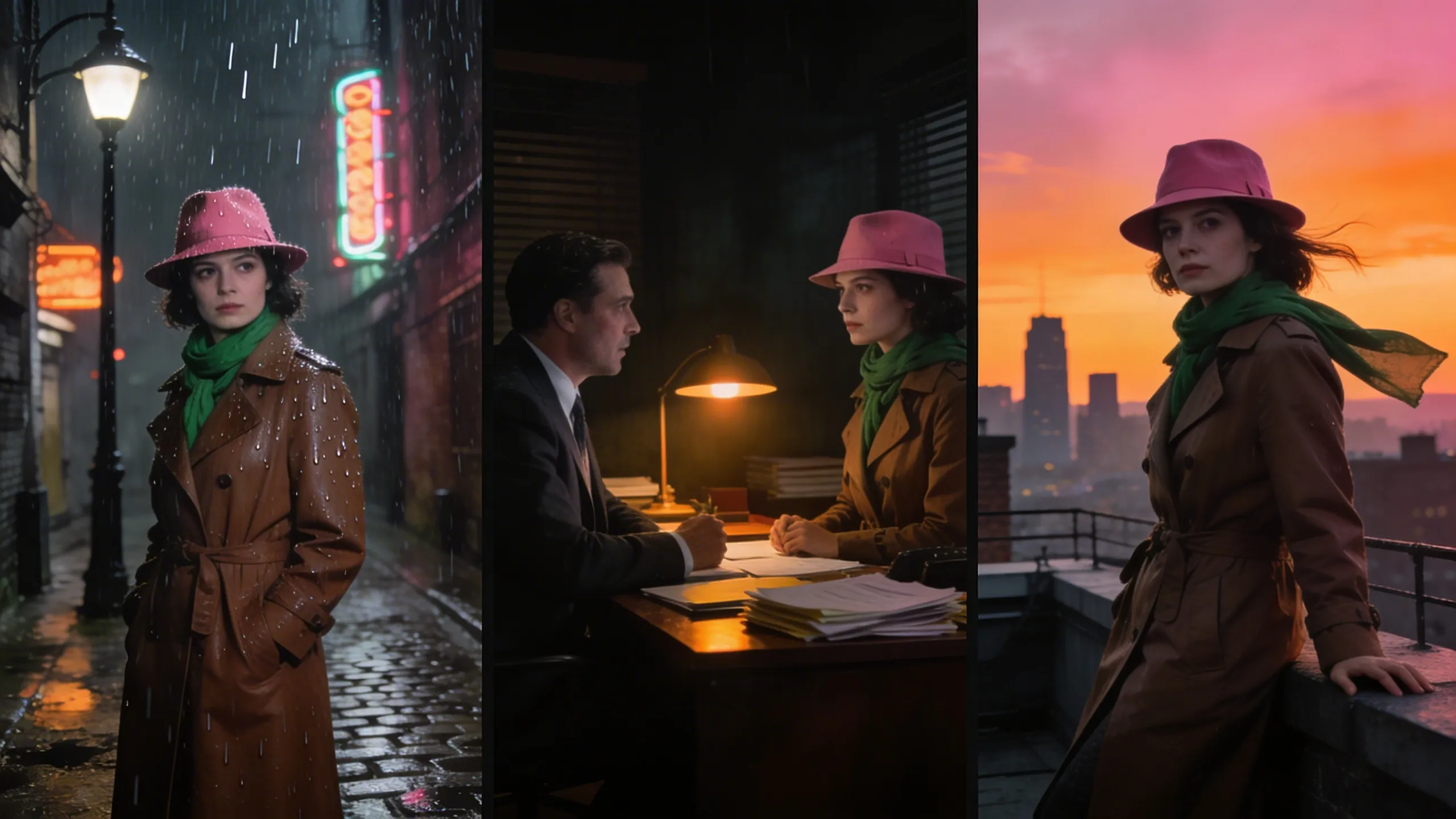
The decision rule, because the setup is not free. Build the references before the first frame if the piece runs past roughly 6 shots, or if there will be a second episode. Skip it for a single pitch frame. Retrofitting consistency means regenerating the whole board, so skipping the setup is only safe when the board is short enough to redo in a few generations.
None of the four vendor pages gives a measured consistency rate or names the conditions where consistency breaks. Treat character consistency as a claim you test on one scene rather than a feature you plan a series around. Holding a look steady across months of output is the same problem as building consistent branding through video: decide the look once and save it as a reference you reuse.
Step 3. Convert the script into frames
Now paste the script in, one scene at a time.
Converting scene by scene is the cheapest way to find out whether the storyboard AI understood you. Higgsfield Popcorn caps a sequence at 8 matching scenes and expects a prompt per scene defining framing, motion and mood, so a long script becomes several sequences either way. Storyboarder.ai will take the whole screenplay file and hand back a shot list and frames, which is faster and also means a misread runs through the entire board before you see it.
What comes back is a draft, and your vocabulary decides how good that draft is. If the shot list line says "interior, office, day" and nothing else, the tool is guessing the framing. Write the angle in yourself. A frame generated from "wide, from the doorway, she is alone in the room" reads much closer than one generated from a scene heading.
Tip: generate the hardest scene first. Whatever you are least sure of visually is the scene that decides whether the tool you are trialling can make your film. Testing it on the easy establishing shot tells you nothing you needed to know.
Once the frames exist the next question is motion, and the tools that turn a still image into video are a separate category with separate limits.
Step 4. Direct each shot, which means deciding what it is for
A storyboard AI will give you a frame for every line you write. It will not tell you whether the line deserved a shot. That judgment is the job, and no tool here does it for you.
Four shot types do most of the work. An establishing shot tells us where we are. Most of the action and the dialogue sits in the medium shot, while the reaction, which is usually where the meaning is, needs a close shot. Inserts are for the object somebody is talking about. Most first boards are medium shots end to end, which reads on screen as flat footage of people talking.
A shot earns its place when it answers a question the shot before it opened. If shot 4 answers nothing, cut it, and the board gets better and cheaper in the same move.
The industry is already betting on this split. In the CVL Economics study co-commissioned by The Animation Guild and three other arts organisations, which polled 300 entertainment executives and managers between November and December 2023, 15% expected storyboarders, animators, illustrators and look artists, counted as one group, to be displaced by 2026, against 33% for 3D modelers, while 38% planned to use generative AI for 2D concept art and storyboards (Cartoon Brew, 2024). The same study found over 90% of those leaders expect generative AI to take a larger role, and only 26% called their workforce fully prepared for it (The Animation Guild). So the same executives who plan to generate the art are the ones saying their teams are not ready to run it.
Shot variety is the same skill as knowing what b-roll is for, used before anything is shot.
Step 5. Approve the board, then render it
An approved board is a production order. This is the point where a storyboard AI either hands you a PDF or starts shooting.
Argil is built on the board-as-production-order shape. Its element flow runs brief, board, shoot, edit, and its homepage describes the Director writing the board, picking the models and shooting every shot. The session view on that page reads "Building the storyboard", then "Reading the approved storyboard", then shooting the film, and the output card for a finished board reads 7 shots, 30 seconds, 16:9, one take, approved.
Argil's thesis page puts it as "The human is the director. AI is the crew", and rejects the alternative in the same breath, calling a typed prompt that returns a finished film "a slot machine, not an art."
Argil publishes three plans. Pro starts from $50 a month with monthly credit tiers you choose, Studio is $1,250 a month and is labelled done with you on the same page, and Enterprise starts from $2,500 a month (argil.ai/pricing).
Credits are spent on generation, and what a generation costs depends on the model and the output, so there is no fixed number of finished videos a month to plan against. Plan credits refresh monthly and do not stack, while pay as you go top ups never expire. Budget a series in generations, since a board you re-roll twice costs three times as much as the one you got right first time. Seedance is the video model in Argil's element list, Nano Banana does the images, and the Director picks which model shoots each shot, so what Seedance does and does not do is worth reading before you commit to a look.
Step 6. Change the shot rather than regenerate the frame
When a frame feels wrong, the instinct is to regenerate it. Resist that and go back and change the shot instead.
Argil describes the loop as building the storyboard scene by scene and producing only once it feels right. That build-then-produce order holds across every storyboard AI tool here, because conversion snapshots the script and the frames you already have do not follow later edits. Re-roll the sample when the decision was wrong and you get a nicer picture of the wrong thing.
Two of the tools here do offer a repair that is not a re-roll. Boords regenerates only the area you mark and leaves the rest of the approved frame intact, and Storyboarder.ai repositions the camera on a frame you already have without generating a new one.
In practice, when two frames in a row feel wrong, the fault usually sits in the shot between them that you never wrote.
Step 7. Carry the approved board into a finished film
Check where your storyboard AI actually drops you before you build a workflow on it, because the exits differ far more than the frames do.
Boords exports PDFs, images, shot lists and an MP4 animatic you can preview with audio. From Storyboarder.ai you can pull a shot list, the storyboard itself, an MP4 animatic with camera motion, or a pitch deck. Adobe Firefly Boards gives you individual frames or the full board as JPEG, PNG or MP4. Higgsfield Popcorn hands over a Sora 2 prompt that is ready to generate, which means the film itself happens inside a different product.
An animatic is a plan that moves and a pitch deck is something you can send. A Sora 2 prompt adds another handoff, and every handoff is somewhere your characters can drift. If the board is the end of your process, any of these works. If the film is the point, the fewer products sitting between the approved board and the render, the fewer times you have to reconcile a look.
Keeping the storyboard and the shoot in one place removes one of those handoffs. Start a board on Argil and direct the shots yourself.
How far each storyboard AI tool takes you
Boords takes a script or a brief and gives back a structured board, with a reference library you recall by @mention. Its free plan covers 5 active storyboards, unlimited manual frames and 8 one-off AI image credits, and free PDF exports carry a watermark. You leave with a PDF or an animatic.
Storyboarder.ai has the widest script input of the set, Fountain and FDX included, and will turn a sketch into a frame. Free gets you 2 projects and 50 image generations. Paid plans add unlimited images and cap you at 10 video generations each. The exit is an animatic or a pitch deck.
Higgsfield Popcorn wants one prompt per scene and takes an optional reference image, stopping at 8 matching scenes per sequence on free daily credits. What you export is a Sora 2 prompt, so the film gets made inside a different product.
Adobe Firefly Boards is one prompt per panel rather than script parsing, with comments and sharing for review, free to start on free daily generations. JPEG, PNG or MP4 out.
Argil is the outlier here. The Director writes the board and then shoots it in place, Pro starts from $50 a month with monthly credit tiers, there is no free plan, and what you leave with is a finished film.
Pick by where your board needs to end up, and weigh one asymmetry while you do. The four tools that stop at the board all have a free tier you can test on a real scene. Argil, the one that carries the board to a finished film, publishes no free plan and starts from $50 a month. Frame quality is what everyone compares, and it moves with every model release, so it is the worst thing to pick a tool on.
FAQ
How does AI turn a script into a storyboard?
The tool reads the script, breaks it into shots, and generates one image per shot. Boords describes converting a pasted script or client brief into a structured storyboard automatically, with a shot list that carries camera angles and scene descriptions. Some tools, including Adobe Firefly Boards, take one prompt per panel instead and leave the shot breakdown to you.
Is there a free storyboard AI?
Yes, with caps. Storyboarder.ai's free plan covers 2 projects and 50 image generations. Boords includes 5 active storyboards on its free plan and watermarks free PDF exports. Higgsfield and Adobe Firefly Boards both give free daily credits without publishing the daily count, so check the limit on their own pages before you plan around it.
Does storyboard AI keep characters consistent across frames?
Only if you give it references. Every tool here builds consistency from saved characters, locations and style references rather than from the script alone. No vendor in this set publishes a measured rate, so run your own character through one scene before you commit a whole board to it.
Can you turn an AI storyboard into a video?
Sometimes, and the route matters. The MP4 animatics you get from Boords and Storyboarder.ai are moving plans, not films. Higgsfield gives you a Sora 2 prompt, so the rendering happens elsewhere. Argil renders the approved board in the same place it was written, which is the shortest route from storyboard to finished film in this set.
Do you still need to understand shot composition?
Yes, and it is the part that does not get automated. A storyboard AI will draw exactly what you asked for, including a board of 11 identical medium shots. Knowing which shots a scene needs, and what each one is for, is the judgment no tool supplies.