How to Write a Bio for Instagram That Converts in 2026
How to write a bio for Instagram that converts profile visits into followers. 5 steps, 10 niche templates, AI prompts, and what to do after.
Article Highlights
- Instagram bios cap at 150 characters total
- How to write a bio for Instagram with hook plus value plus single CTA
- Niche-narrowed bios convert profile visits to follows
- One CTA wins. Three CTAs cut conversion in half
- Bio templates by niche: coaches, agents, lawyers, e-commerce
- Argil turns the bio into daily Reels at scale
How to Write a Bio for Instagram That Converts in 2026
Your Instagram bio gets fewer than 3 seconds of attention. In that window a stranger decides whether to follow, click, or scroll on. Most bios waste those 3 seconds on job titles, vague mission statements, and three competing calls to action.
This guide walks through how to write a bio for Instagram that converts profile visitors into followers. You get a 5-step process, the bio formula that works in 150 characters, 10 templates by niche, and the AI prompts that produce strong drafts. At the end, the part nobody else covers: what to do once the bio is set, because a bio cannot save an account that does not post.
What makes an Instagram bio actually convert
Conversion on Instagram is a stack of small numbers: the percentage of profile visits that turn into follows, the click-through rate on your bio link, the rate of saves to DMs. The benchmark for profile-visit-to-follow on Instagram sits around 13.5% as a monthly average, according to Flick's analytics data. Bio link click-through rates land around 2-3% for organic traffic, based on a 2025 analysis of 1,200 campaigns published by Tapmy. Your bio is the single biggest lever on both numbers.
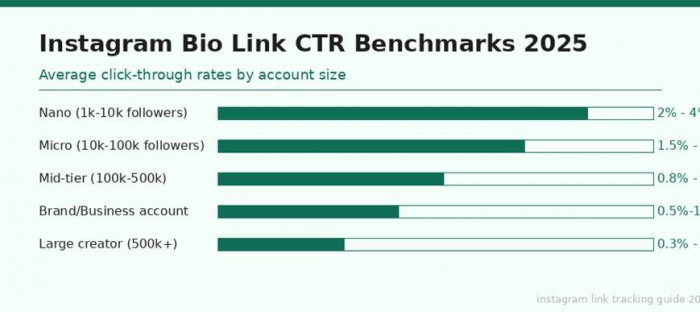
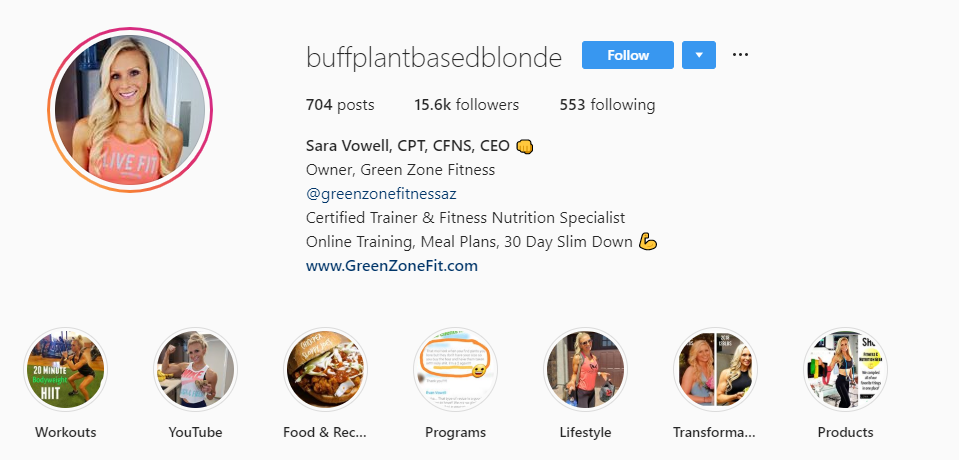
Image source: SmartPostly
The hard constraint is 150 characters. Everything you want to say about your work, your audience, and your offer has to fit inside that window. Most accounts try to cram in a full bio, a tagline, three emojis as decoration, two links, and a quote. The result reads like a CV that nobody asked for.
Here is the formula every bio in this guide uses:
- Hook (first line): a statement that makes a stranger want to keep reading.
- Value (second line): who you help and the specific outcome they get.
- CTA (last line): one explicit action the visitor should take next.
Bios fail in 2026 for predictable reasons. Vague descriptors that could apply to anyone. Skill lists that read like a LinkedIn headline. Three competing CTAs that ask the visitor to follow, click, and DM in the same six lines. Pick one job for the bio. The bio is the headline of a landing page, not a resume.
Step 1: Define your niche in one sentence
The most common bio mistake is trying to serve everyone. "Helping people grow" tells nobody whether you are talking to them. The fix is brutal specificity: pick the exact person you help and the exact outcome you deliver.
The 'I help X do Y so they Z' template
Run your work through this template first, then compress. A few examples, narrowed by niche:
- Coach: I help operations leaders run weekly 1-on-1s that cut turnover by 30%.
- Real estate agent: I help first-time buyers in Brooklyn close on a home in under 90 days.
- Lawyer: I help freelance designers protect their work without a $5,000 retainer.
- E-commerce brand: We make denim that fits petite women without alterations.
- B2B founder: I help SaaS founders book 30 sales calls a month from cold outbound.
Notice what is missing: "passionate," "transform," "empower," "unlock." Notice what is present: a real person, a real problem, a measurable outcome. A narrow niche statement converts better than a broad one because relevance beats reach in a 150-character surface. The stranger who matches your niche feels seen. The stranger who does not scrolls past, and that is the right outcome.
Run the niche test on your draft
Three quick checks before you commit to a niche line:
- Read it aloud. If you stumble on it, the niche is unclear. Stumbling means you are still describing yourself in industry jargon.
- Send it to three people outside your industry. Ask them to describe what you do in one sentence. If their version is sharper than yours, copy theirs.
- Replace every abstract noun with a verb plus a measurable outcome. "Drive impact" becomes "book 30 sales calls." "Build community" becomes "grow newsletters past 10,000 subscribers."
Step 2: Write your first line, the bio hook
The first line of your bio is the only line a passive visitor reads. If it does not earn the next 4 seconds of attention, the rest of the bio never gets seen. Treat it like a headline, not a label.
Use one of three hook formulas that consistently earn the read:
- Outcome hook: "Helping 1,000 lawyers post weekly without filming." Specific number, specific audience, specific outcome.
- Curiosity hook: "Built a $40k/mo brand on 2 hours a week." Names the result, hides the method, makes the reader want to know how.
- Identity hook: "AI-native founder. Builder. Filmmaker." Three nouns, no verbs. Works for personal accounts where the reader is buying you, not your service.
On emojis: use one or two as left-aligned bullets, never as decoration sprinkled through a sentence. Emojis as bullets create visual hierarchy. Emojis as punctuation make the bio look like a teenager wrote it on a sleepover.
Retire these openers: "Welcome to my page," "Founder | Speaker | Writer | Thought Leader," and inspirational quotes. Every one signals an account that has not thought about what it is selling.
Test the hook on its own. Cover the second and third lines with your finger. Read only the first line. Would a stranger keep reading? If not, rewrite. The hook does not need to be clever. It needs to be specific.
Step 3: Choose a single CTA
This is the rule that fixes more bios than any other: one CTA, not three. Every additional call to action past the first roughly halves the conversion of all of them. The visitor freezes when given 3 options and picks none. This is the well-documented paradox of choice in landing-page research, and an Instagram bio is a landing page.
Three CTA archetypes that perform in 2026 bios:
- DM CTA: "DM me 'system' for the workflow." High-intent. Best for service businesses and consultants. Filters tire-kickers, opens a real conversation, makes the next step trivial.
- Link CTA: "Free 30-day calendar template in link." Mid-intent. Best for creators with a product or lead magnet. Pairs with a single landing page that delivers exactly what the bio promised.
- Post-drop CTA: "New Reels every Monday." Follow-trigger. Best for pure media accounts where the goal is audience growth, not direct conversion.
Match the CTA to your business model. A consultant whose bio says "link in bio" trains visitors to click through and never come back. A consultant whose bio says "DM me 'audit' for a 10-minute call" trains visitors to start a conversation. Same audience, very different pipeline.
Where to physically place the CTA: last line, on its own, separated from the value line by whitespace. Optionally preceded by a single arrow or pointer emoji. The CTA needs to be the line the eye lands on last, not a sentence buried in the middle of the bio.
Step 4: Format the bio for scannability
Formatting separates a bio that gets read from one that gets glanced at. The Instagram bio editor on mobile strips line breaks. Type your bio directly into the app and it collapses into a wall of text the second you save. Write it elsewhere first.
Three reliable methods for preserving line breaks:
- Type the bio in the iOS or Android Notes app, then copy and paste into the Instagram bio field. Line breaks survive.
- Use Pallyy's bio formatter, paste your text in, copy the formatted output, paste into Instagram.
- On desktop: edit the bio in a browser. Desktop preserves line breaks natively. Mobile does not.
On capitalization: title-case the niche line, sentence-case everything else. Title case on the first line creates emphasis without bold. Sentence case on the value and CTA lines keeps the bio from reading like a billboard.
On whitespace: a blank line between the value statement and the CTA gives the eye a rest and pushes the CTA into its own visual block. The bio reads in three beats instead of one paragraph.
Step 5: Add and rotate your link
Single link or Linktree: it depends on what you sell. A single link wins for one-product creators, single-funnel businesses, and any account where the visitor needs to do exactly one thing next. A Linktree-style hub wins for multi-product brands and businesses with three or more legitimate landing pages, but it costs you a click in the funnel.
Track everything. Every link in the bio gets a UTM parameter so you know which content drove which clicks. The minimum tag set: utm_source=instagram, utm_medium=bio, utm_campaign=[campaign-name]. Without tracking you cannot tell whether your bio link or your Reels are doing the work.
Rotate the link with the campaign. The link should match whatever the current grid is talking about, whether that is a launch, a free resource, a new product, or a podcast episode. A link to a generic homepage that has not changed in 6 months is dead weight, so update it monthly at the minimum.
10 Instagram bio templates by niche
Templates are starting points, not final bios. Replace the brackets with your specifics, then run each draft through the niche test in Step 1 and the hook test in Step 2 before publishing.
Coaches and creators
Business coach example, filled in:
[Helping ops leaders run 1-on-1s that cut turnover 30%]
[Free meeting template, link below]
[New post every Tuesday]
Content creator example, filled in:
[Built a $40k/mo brand on 2 hours a week]
[I post the playbook here weekly]
[DM 'system' for the workflow]
Coach bios over-index on credentials. "Certified ICF coach. NLP practitioner. Two-time bestselling author." None of that tells the visitor what they will get. Lead with the outcome. Add one credential as social proof only if it matches the niche. A leadership coach citing TechCrunch is a mismatch.
Service businesses (real estate, law, agency)
Real estate agent example, filled in:
[Brooklyn agent | Helping first-time buyers close in under 90 days]
[Free buyer prep guide in link]
[DM 'tour' to see this week's listings]
B2B agency example, filled in:
[We book 30 sales calls/mo for SaaS founders from cold outbound]
[Case studies in link]
Local SEO bonus for service businesses: include the city in line two. Instagram surfaces accounts in nearby-Reels recommendations partly based on bio text matching. "Brooklyn agent" makes you discoverable to Brooklyn searchers in a way "NYC real estate professional" does not. Real estate accounts are scaling content output with AI as well, and we covered the mechanic in our breakdown of how real estate agents are creating viral UGC videos with AI in 2026.
E-commerce and product brands
DTC brand example, filled in:
[Denim that fits petite women, no alterations]
[Free fit quiz in link]
[Ships in 48 hrs]
SaaS founder example, filled in:
[Building [tool name] | helping freelancers send invoices in 30 sec]
[Try free in link, no card required]
Hashtag placement: last line if you use one at all, never first. A hashtag in line one of your bio reads as desperate for discovery. Branded hashtags belong below the value prop, after the link, as a footer.
Founder face vs logo: when the founder is the brand, use the founder's face on the avatar. When the product is the brand and the founder rotates, use the logo. Hybrid setups, with the founder running a personal account and the logo running the brand account cross-linked, are the norm for most strong operators. We unpacked the mechanics in our piece on personal brand examples that actually drive business.
Personal accounts and side projects
Build-in-public founder example, filled in:
[Building [project] in public | $0 -> $10k MRR, week by week]
[Latest update in link]
Niche commentator example, filled in:
[Reading every climate-tech S-1 so you don't have to]
[Newsletter in link, every Sunday]
"Just sharing my journey" works in two cases: the journey is at a stage strangers want to follow (zero to one, public, with numbers), or the niche around it is unusually narrow. Without either, it reads like a private locked diary. Add credentials by stating a result, not a title. "Sold my last company for $4M" beats "Serial entrepreneur."
AI prompts that generate strong Instagram bios
AI tools handle the first draft well. They handle the final bio badly. Use the prompts below to get a usable starting point, then edit by hand.
Prompt 1, full draft:
Write an Instagram bio for a [niche] who helps [audience] [outcome]. Hook line first, value line second, single CTA last. 150 characters max. Avoid generic phrases like 'helping you grow' or 'transform your life.'
Prompt 2, variations:
Give me 10 Instagram bio variations for a [niche]. Each must lead with a different hook archetype: outcome, curiosity, identity, contrarian, social proof, question, statement of belief, before/after, specific number, named audience.
Prompt 3, audit:
Audit this Instagram bio: [paste]. Flag any vague descriptors, missing CTA, multiple competing CTAs, formatting issues, or lines that could apply to anyone. Rewrite with edits inline.
Feed the prompt your niche, your one-sentence value prop, your exact CTA, and 3 example bios from creators whose voice you want to emulate. The more specific the inputs, the more usable the draft.
After generation, cut every "transform," "unlock," and "empower" on the first pass. AI defaults to motivational copy that reads like an airline magazine. Replace each inspirational sentence with a concrete number or outcome.
After the bio: drive followers with consistent video content
Here is the part nobody puts in bio guides. A perfect bio cannot save an account that does not post. Bios convert traffic. They do not generate it.
Posting daily Reels and short-form video is the single most reliable Instagram growth lever in 2026. Reels reach roughly 125% more users than photo posts, according to Dash Social's 2025 benchmark report, and 55% of Reels views come from non-followers, which makes them Instagram's strongest discovery format. Yet Buffer's analysis of 2 million Instagram posts found that most creators are not posting Reels regularly, even though the growth data is clear.
The bottleneck is rarely ideas, scripts, or editing. The real block, for almost every account I have watched stall, is the willingness to film yourself daily.
Argil removes that bottleneck. Train an AI clone on a 2-minute video of yourself, then generate fully edited Reels from a script, or paste a blog post and get a video out the other side without opening the camera app. We walked through the full process in our guide to how to fully clone yourself with Argil in 2026.
Workflow example: in the same afternoon you write your bio, generate 30 Reels for the next month using your Argil clone. Every Reel uses your face from your scripts, with captions, b-rolls, and transitions handled automatically. The bio finally has consistent traffic to convert.
Pricing: Argil's Classic plan starts at $39 per month for individual creators, which includes 1,600 monthly credits and 100+ avatar styles. Compare that to a freelance video editor at $3,000 per month who still requires you to film weekly. The economics are not close.
If you are not comfortable putting your own face on every Reel, there are 7 faceless Reels methods that work in 2026, and we covered how to create video content without ever being on camera in a separate guide.
The bio is a conversion surface. Reels are the growth surface. Get both right and the follower-count math finally works.
FAQ
How many characters does an Instagram bio allow?
Instagram bios cap at 150 characters total, including text, emojis, line breaks, and spaces. The limit applies to both personal and business accounts and has not changed in 2025 or 2026.
Should I use emojis in my Instagram bio?
Use one or two emojis as left-aligned bullets to create visual hierarchy on each line. Avoid sprinkling emojis through sentences as decoration. Used as bullets, they help scannability. Used as punctuation, they make the bio look unprofessional.
Can I add multiple links in my Instagram bio?
Instagram allows up to five links in the bio field, but adding more than one usually hurts conversion. Most accounts get better results from a single link or a Linktree-style hub when they have three or more legitimate landing pages.
What is the best Instagram bio for a small business?
A small business bio works best with a one-line niche statement at the top, the city or service area on line two, and a single CTA on line three. Skip corporate jargon. Lead with the specific outcome you deliver and one credential that matches your audience.
How often should I update my Instagram bio?
Update the bio link monthly to match your current campaign or lead magnet. Update the value line and CTA only when your offer or audience changes. Constantly rewriting the bio confuses regular visitors and breaks any saved bookmarks.
Does the Instagram bio affect SEO or discoverability?
Yes. Instagram surfaces accounts in nearby-Reels recommendations and search partly based on bio text. Including your city, your niche, and one or two relevant keywords in the bio improves your discoverability without compromising readability.
Should I use my real name or a brand name in the bio?
Use your real name when the brand is you (consultant, creator, founder building in public). Use the brand name when the product is the brand and the founder rotates. Hybrid setups with a personal account and a brand account work for most operators above $1M in revenue.
Related Articles
- Personal Brand Examples That Actually Drive Business (and What AI Changes Next)
- How to Become a Content Creator in 2026
- What Is a Digital Creator in 2025 and How They're Scaling with AI Avatars Now
How to write a bio for Instagram that converts profile visits into followers and customers in 2026.