Instagram Reel Size: The Complete 2026 Spec Sheet for Creators
The 2026 Instagram reel size reference: 1080x1920, 9:16, up to 3 minutes, 4GB cap, safe zones, aspect ratios, and why spec compliance drives reach.
Article Highlights
- Reel size covers pixels, ratio, duration, file
- Native spec: 1080x1920, 9:16, up to 3 minutes
- 4GB file cap, 23 to 60fps frame rate
- Safe zone: center 1080x1420 pixel area
- 4:5 and 1:1 ratios get padded, not cropped
- Argil outputs directly at the right spec
- Argil automates spec compliance end to end
Instagram Reel Size: The Complete 2026 Spec Sheet for Creators
Instagram reel size is not a single number. It is 4 specs stacked together: pixel dimensions, aspect ratio, file size, and duration. Each one is enforced at upload, and each one shapes how the video gets distributed once it lands.
This reference covers the full 2026 spec: every dimension, every ratio, every duration, every safe zone.
What Is Instagram Reel Size? A Clear Definition
Instagram reel size is the combination of pixel dimensions, aspect ratio, file size, and duration that determines how a video renders and gets distributed across Instagram's surfaces.
Resolution sits at 1080x1920 for the recommended export, and Sprout Social lists 1440x2560 as the premium ceiling. Aspect ratio is 9:16 native. File size is capped at 4GB. Duration runs from 3 seconds to 3 minutes when recording in-app, with uploads accepted up to 15 minutes in some surfaces.
Why all 4 matter at upload: Instagram re-encodes every video on ingest. If your file sits outside spec, the re-encode introduces compression artifacts, black bars, or cropped frames. Watch time drops, and watch time is Instagram's core ranking signal.
Filming inside the Instagram camera defaults to spec, but anything you import from a phone gallery or editor is on you. That is where most reel size mistakes happen: black bars on import, cropped subtitles after re-encode, file size rejection on long exports.
Instagram Reel Dimensions and Resolution: The Full 2026 Spec Sheet
Below is the full 2026 spec, one block at a time.
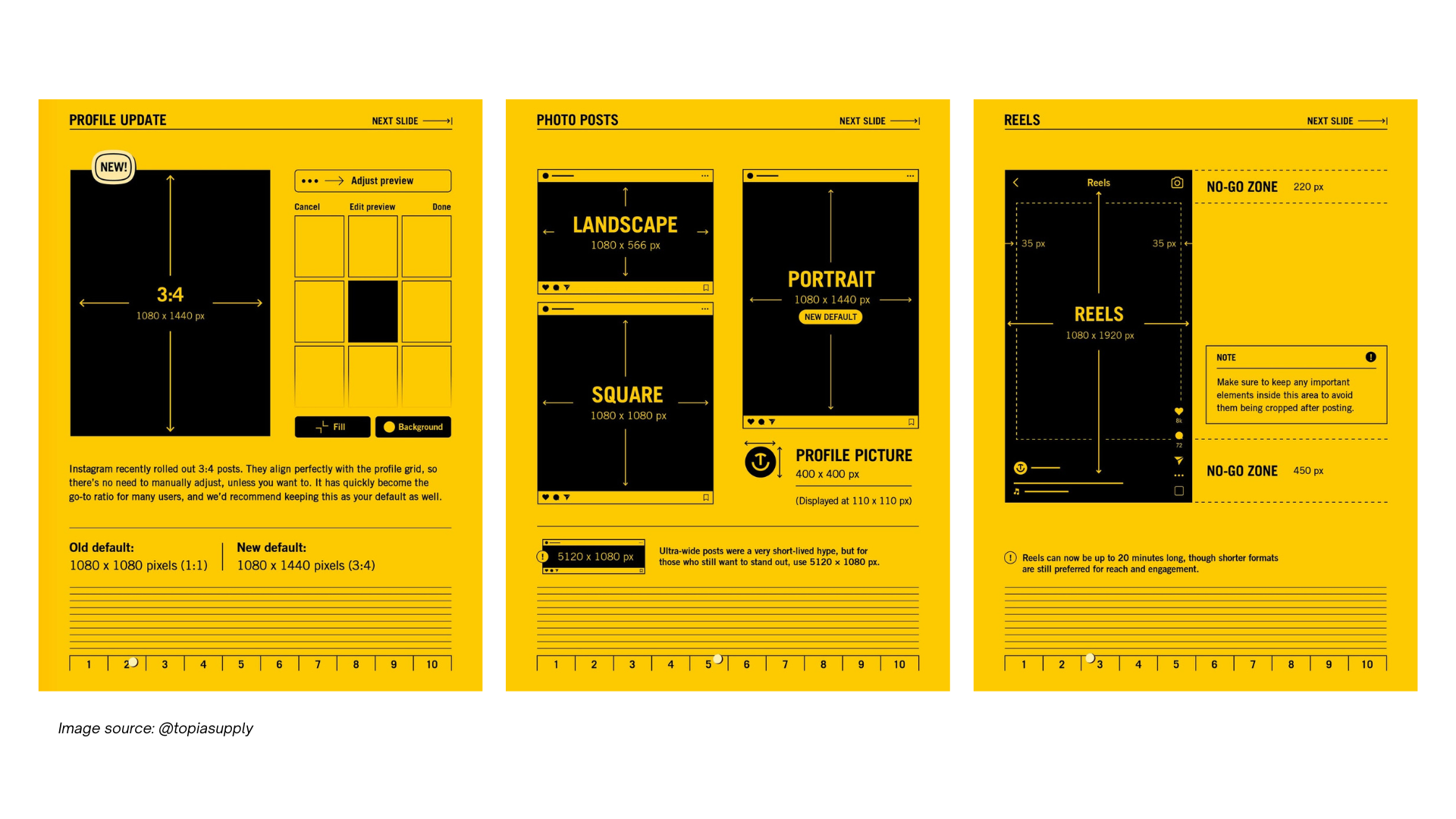
Recommended resolution sits at 1080x1920 pixels, Full HD vertical. The minimum accepted is 500x888 pixels, though anything below 720x1280 pixelates on mid-size or larger phones. Always export at 1080p from any editing software.
Frame rate runs between 23 and 60fps. 30fps is the clean default and looks native in the feed. 60fps gives smoother motion but roughly doubles file size, so use it only when the smoothness reads. 24fps is accepted but can judder on quick movement.
Instagram reel size is the mix of pixel dimensions, aspect ratio, file size, and duration that determines how your video looks and performs across Instagram.
File formats: MP4 with H.264 codec is the safest default, and MOV works fine. H.265 and HEVC are supported but can fail on older devices, so stick with H.264 unless you have a reason not to.
Maximum file size is 4GB, per Sprout Social's Reels spec reference. A 90-second 1080p Reel at standard bitrate usually lands under 1GB, so the 4GB cap only matters at very high bitrate exports from professional tools.
Audio runs as stereo AAC at 128kbps minimum. Instagram normalizes volume on upload, so mixing your master to around -14 LUFS avoids the post-upload volume drop that happens when loudness exceeds platform limits.
Safe Zones: Where to Place Text, Stickers, and Captions
The safe zone is the part of the frame where your on-screen content stays visible after Instagram's UI loads on top.
The center safe zone spans 1080x1420 pixels. The top 250 pixels of the frame are occupied by the account handle and the audio attribution bar. The bottom 250 pixels sit under the caption, the like and comment row, and the share button. Anything that matters visually belongs inside the center zone.
The left edge also matters. Keep key content at least 100 pixels from the left. On non-follower views, the follow button can overlap the far-left column on some screen sizes.
Grid thumbnail cropping adds another layer. When the Reel appears on your profile grid, Instagram crops to a 1:1 square from the center of the 9:16 frame. Any text or branding placed only in the upper or lower third gets cut off in the grid preview. Design for both views or set a custom cover image that handles the grid crop separately.
Instagram Reel Aspect Ratios: 9:16, 4:5, and 1:1 Explained
Reels support 3 aspect ratios, and each one behaves differently depending on which Instagram surface plays it back.
9:16 is the native ratio: vertical and full-screen at 1080x1920 pixels. In the Reels feed, Explore, and Stories, 9:16 takes over the entire screen with no padding, which makes it the maximum-attention option and the default choice for anything shot or generated vertically. Argil's guide to aspect ratios for vertical and horizontal video walks through when to pick each one and why.
4:5 is the portrait feed-optimized ratio at 1080x1350 pixels. A 4:5 Reel displays taller than a standard square in the feed but does not fill the screen in the Reels tab. Instagram letterboxes it with a blurred background fill. The trade-off is useful if you are repurposing feed-first content into Reels, since the 4:5 version looks good in both places.
1:1 is the square ratio at 1080x1080 pixels. It is the least immersive in the Reels feed because Instagram pads it top and bottom with a blur fill. If the source content was shot square, 1:1 works, but do not choose it on purpose for a Reel-first asset.
Cover Image Specs: Designing for the Reels Tab and the Profile Grid
Cover images count even though they are stills. They drive click-through from the Reels tab and shape how your profile grid looks.
Reels tab cover sits at 1080x1920 pixels, 9:16. This is the thumbnail shown when someone scrolls the Reels tab on your profile. It renders at roughly 350x622 pixels on mobile, so anything small-text or low-contrast fails to read. Design for the small render.
Profile grid cover gets auto-cropped to a 1:1 square taken from the center of the 9:16 image. Keep the important element inside the 1080x1080 middle zone, not near the top or bottom edges, or it will get clipped on the grid.
Instagram Reel Duration Options: From 15 Seconds to 3 Minutes
Duration is part of the size spec and has shifted multiple times since Reels launched. The 2026 state: up to 3 minutes when recording in-app, up to 15 minutes when uploading from external sources, based on Hootsuite's January 2025 Reels spec update.
In-app recorders see fixed duration buckets at 15, 30, 60, 90 seconds, and 3 minutes. All 5 options are selectable during recording. Uploaded videos can be any length up to the 15-minute upload cap, though Reels distribution logic still treats longer runtimes with more caution.
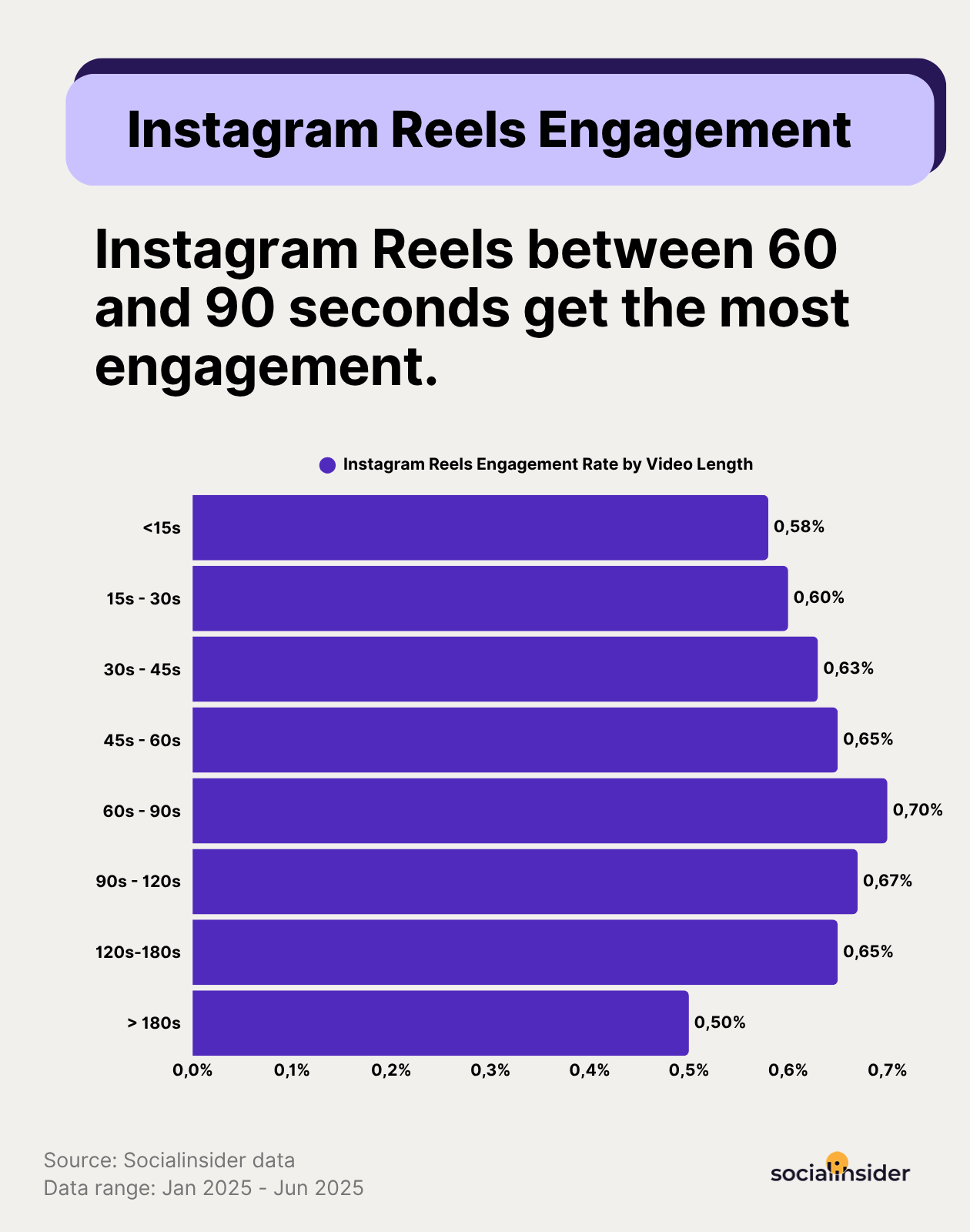
What each length is best for:
- 15 to 30 seconds. Strongest for hook-driven content, trend participation, and entertainment formats. Completion rate is easiest to hit at short length, and completion rate is weighted heavily in distribution.
- 60 to 90 seconds. Best for tutorials, product demos, and short educational content where depth adds value. Saves and shares often outpace completion here because the content feels useful. Creators working at volume often cut these from longer source footage using tools covered in the best clipping software for 2026.
- 90 seconds to 3 minutes. Use only when the content genuinely requires the runtime. Storytelling, layered tutorials, creator interviews. Watch-percentage drops but total watch time can climb if retention stays high.
Algorithm implication: Instagram scores Reels on average watch percentage, not total watch time. A 90-second Reel watched to 50% carries the same watch-percentage score as a 45-second Reel watched to completion. Length should follow what the content can sustain without filler.
Why Instagram Reel Size Affects Reach: The Platform Logic
Every spec on this sheet connects back to distribution. Instagram does not announce distribution penalties, but the cause-and-effect pattern is consistent across creators who publish at volume.
Wrong dimensions trigger re-encoding. When Instagram has to crop, letterbox, or recompress a video because it falls outside spec, the output quality drops. Lower quality lowers early engagement. Lower early engagement suppresses distribution to non-followers.
Safe zone violations kill watch time. If your caption, CTA, or key text gets covered by the UI bar, viewers scroll in the first 2 to 3 seconds, and early drop-off is the single clearest negative signal in the Reels ranking system. A misplaced subtitle can cost an entire Reel its reach.
9:16 beats 4:5 and 1:1 on attention because full-screen vertical fills every pixel of the viewer's phone, while padded content gives the eye an excuse to look elsewhere. Longer watch time is what Instagram's distribution layer actually rewards.
Cover design controls click-through on the Reels tab. Skip it and your grid looks cluttered, which lowers tap-through from profile visitors. Most creators give cover design 30 seconds because the Reel feels finished by then, which is why treating the cover as a separate design step is the easiest fix on this list.
How to Always Get Instagram Reel Size Right: Practical Workflow
There are 2 routes: manual spec management or automated output.
Manual Approach: Filming and Editing to Spec
Film natively on iPhone or Android in portrait mode, since both default to 9:16 at 1080x1920. Lock focus before you start, use a tripod or gimbal for stability, and shoot at 30fps unless you need 60fps for smoother motion.
Export settings in CapCut, Premiere Pro, or Final Cut: set the canvas to 1080x1920, export as MP4 with H.264 codec, bitrate between 8 and 15 Mbps, 30fps. Before uploading, confirm the export preview shows no black bars and no cropped edges.
Safe zone overlay is the step most creators skip. Drop a 1080x1420 safe zone template layer into your editing timeline. Any text, sticker, or CTA that crosses that boundary is at risk of being covered on some devices, so move it inside or cut it.
AI-Powered Approach: Let Argil Handle the Format Automatically
For creators publishing at volume, manual spec management becomes pure overhead. Argil takes that off your plate by outputting at the correct spec by default.
Upload a 2-minute video of yourself talking. Argil uses that footage to build an AI video clone trained on your face, voice, and delivery. Feed the clone a script and Argil generates a fully-edited short-form video. The output lands directly at 1080x1920, 9:16, with captions auto-placed inside the safe zone, transitions applied, and B-roll inserted. Argil's breakdown of the best AI avatar generators in 2025 covers how the clone approach compares with alternative AI avatar tools.
Spec compliance is automatic. No canvas setup, no export preset, no re-encoding risk. You go from script to publish-ready file without ever touching a dimension setting. At daily posting cadence, that is the difference between shipping 5 reels a week and shipping 1. Argil's pricing starts at $39/mo for the Classic plan, which covers the full creator-scale workflow.
Multi-format output matters here too. You write the script once, and Argil renders a 9:16 Reel for the Reels feed, a 1:1 tile for the profile grid, and a cross-platform version for TikTok ads or YouTube Shorts from the same source. For context on where this fits in the wider creator stack, see Argil's take on what a digital creator looks like in 2025 and how they scale with AI avatars.
FAQ
What is the ideal Instagram Reel size in 2026?
1080x1920 pixels at a 9:16 aspect ratio. This is the native full-screen vertical format. It gives the Reel maximum screen coverage in the Reels feed, Explore, and Stories surfaces.
What is the maximum file size for an Instagram Reel?
4GB. A standard 1080p Reel at 30fps stays well under 500MB at 90 seconds, so the 4GB cap only applies when exporting at unusually high bitrates from professional video software.
Can you post a horizontal video as an Instagram Reel?
Yes, but Instagram letterboxes it with a blurred background rather than cropping. The video will not take up the full screen in the Reels tab. For maximum reach, convert horizontal footage to 9:16 using an editing app or an AI tool before uploading.
What happens if my Reel is the wrong size?
Instagram re-encodes the video and may crop, pad, or compress it to fit the display surface. This processing introduces quality loss. If the wrong dimensions push key content into the UI overlay zones, watch time drops, which reduces distribution.
How long can an Instagram Reel be?
Up to 3 minutes when recording in the Instagram app. Uploads from external sources can run up to 15 minutes in some surfaces, though distribution logic still favors shorter runtimes. Minimum recorded length is 3 seconds.
Where should I place text so it is not covered by Instagram's UI?
Keep all text, stickers, and CTAs inside the center 1080x1420 pixel safe zone. Avoid the top 250 pixels (account handle and audio bar) and the bottom 250 pixels (caption, engagement row, and share button).
Does Instagram Reel size affect reach?
Yes. Spec-compliant uploads avoid re-encoding quality loss, which preserves engagement signals. Safe zone compliance keeps key content visible and protects watch time. 9:16 captures more screen than 4:5 or 1:1, which lifts completion rates and broader distribution.
Related Articles
- Which AI avatar platform is easiest to use in 2025 comparing HeyGen, Synthesia, Argil, D-ID, Veo 3, and Sora
- AI influencer generator: 5 best platforms for creators in 2026
- What's happening in the creator economy in 2025
Instagram reel size reference sheet: dimensions, aspect ratio, duration, file size 2026.
Editor notes from qa-articles - final score 98/100, 1 iteration: Triplet density is 47.9% (above the 30% threshold). Most triplets are content-justified enumerations of specs (e.g. resolution, ratio, duration). Consider swapping a few comma-triplets for pairs (X and Y) or four-item lists during final read.