UGC Creator Tools 2026: Best Picks by Job (Scripting to AI)
UGC creator tools compared by job: scripting, filming, editing, and AI generation. See the best picks with 2026 pricing and how to scale video output.

Article Highlights
- UGC creator tools mapped to four jobs
- Best scripting, filming, editing, and AI picks
- What is a ugc creator stack, built for volume
- Filming time is the real output ceiling
- HeyGen vs Argil for AI-generated UGC video
- Argil keeps your own face while scaling ads
The best UGC creator tool stack in 2026 is not the one with the most apps. It is the one that fixes your slowest job. A UGC workflow has four jobs, scripting, filming, editing, and AI generation, and most creators only need one tool per job. If you can only add one paid tool this quarter, add the one that attacks filming time, because that is the constraint that caps how many ads you can ship per week.
That single idea should decide your whole stack. A creator who already writes fast hooks does not need another scripting app. A creator drowning in reshoots does not need a fancier editor, they need to film less. The rest of this guide walks the four jobs, names a leading tool for each with real pricing, and ends with a decision framework so you can match your money to your actual bottleneck instead of the longest feature list.
Two numbers explain why brands keep paying for this content at all. Around 92% of consumers trust user generated content more than traditional advertising, per widely cited Nielsen consumer trust data, and product pages that feature UGC convert at up to 161% higher rates than pages without it, according to the same 2026 UGC statistics roundup. That trust and conversion gap is the reason a performance team will happily pay a UGC creator who can keep the fresh variations coming.
The UGC creator tool stack, organized by job
Before the picks, hold the frame. Every tool below slots into one of four jobs, and you should read the list looking for the job you are worst at, not the tool with the flashiest demo.
- Scripting: turning a brand brief into native-sounding hooks and short scripts, fast and in volume.
- Filming and recording: capturing clean footage and audio, with a teleprompter so on-camera delivery stays smooth.
- Editing: cutting, captioning, and formatting raw footage into a finished vertical ad.
- AI generation: producing finished video from a script without filming each one, which is how creators break the volume ceiling.
Match each tool to the job you are slowest at. That is the entire method. A stack that fixes your bottleneck beats a stack of best-in-class tools you do not have time to use.
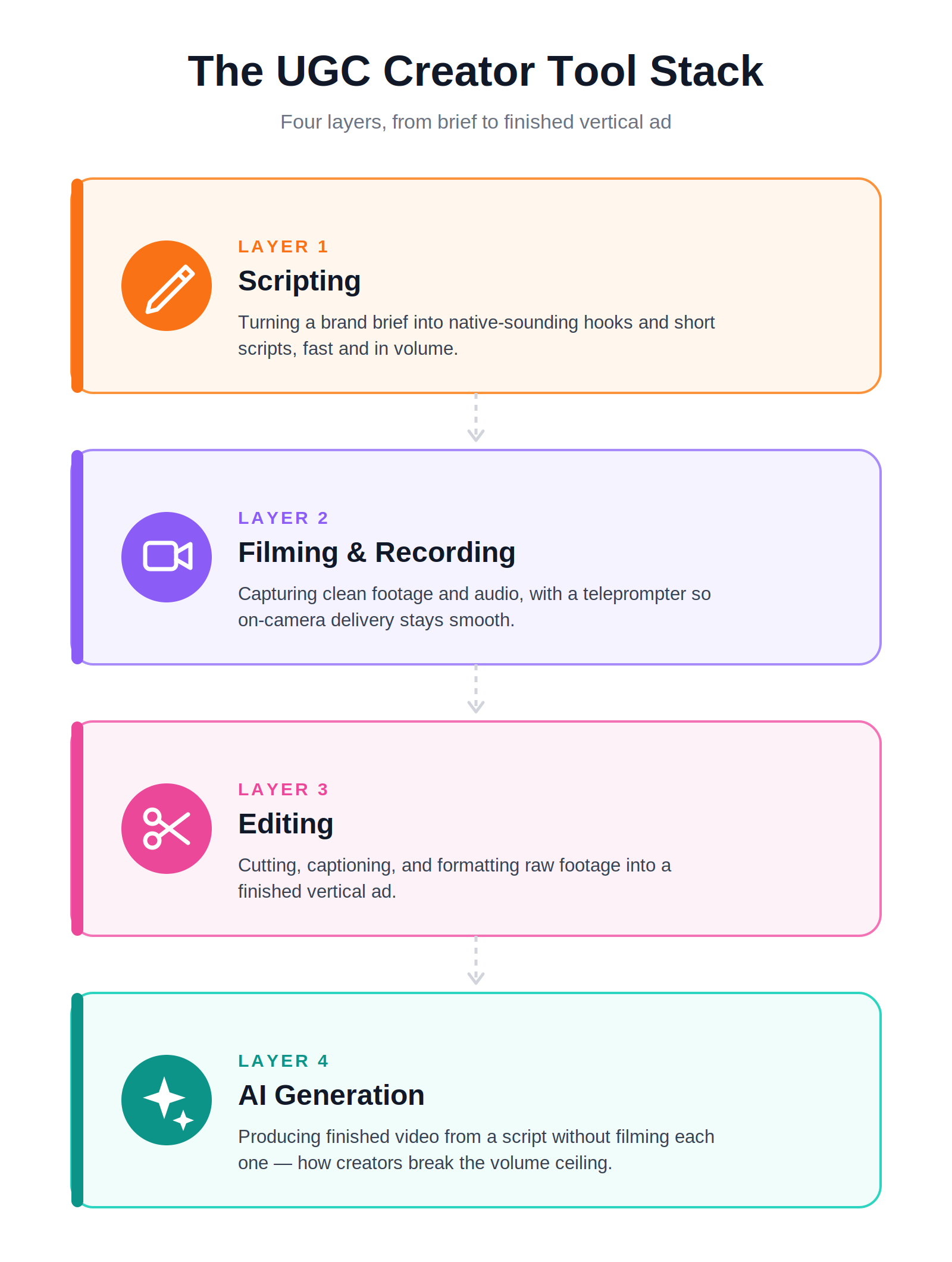
The four key aspects of content creation. Image generated using Claude.ai.
Scripting tools
The scripting job is turning a one-line brand brief into ten hook variations and rough scripts that sound like a real person, not a press release. This is where volume starts, because paid social needs many angles per product, not one clever line.
ChatGPT
ChatGPT is the default scripting tool for most UGC creators, and for good reason. It generates hook variations in seconds, reframes a single script for different angles, and turns one brief into many ad versions you can then tighten by hand.
- Strengths: fast hook variations, angle reframing, and drafting many script versions from one brief.
- Limitations: output sounds generic without a strong prompt and a clear voice reference, and it always needs a human edit pass before it goes on camera.
- Best use case: brainstorming 10 hook options and rough scripts a creator then sharpens into something that sounds like them.
- Pricing: free tier available, ChatGPT Plus runs $20 a month per OpenAI's pricing.
The trap here is trusting the first draft. ChatGPT gets you to a fast rough version, but shipping its raw output is how UGC starts sounding like every other AI ad in the feed. Use it to beat the blank page, not to write the final line.
Filming and recording tools
The filming job is capturing clean footage and audio, plus a teleprompter that keeps your eyeline natural while you read a script. For a UGC creator, this is usually the most time-expensive job in the whole workflow.
A smartphone plus a teleprompter app such as BIGVU
You do not need a cinema camera to make UGC that converts. A recent smartphone plus a teleprompter app covers most briefs, and the teleprompter is the part that actually matters, because reading a script while looking natural on camera is a learned skill most people fake badly.

Image source: Bigvu
- Strengths: low cost, quality that is more than good enough for paid social, and a teleprompter that keeps delivery smooth while you read.
- Limitations: every single video still has to be filmed in real time, which is the core volume bottleneck this whole guide keeps circling.
- Best use case: creators who want a genuine human-on-camera feel and have the hours to film each deliverable.
- Pricing: BIGVU has a free-forever tier, with the paid Starter plan at $12 a month per BIGVU's pricing.
Here is the honest limit of filming tools. No teleprompter, camera, or lighting kit fixes the real problem, which is that human filming does not scale. A better setup makes each video nicer. It does not let you make more of them in the same day. That is a different job.
Editing tools
The editing job is cutting, captioning, and formatting raw footage into a finished short-form ad. Captions alone are non-negotiable now, since most paid social plays muted, so this job is table stakes even for creators who film everything themselves.
CapCut
CapCut is the most common editor in the UGC world, and it earns the spot. It handles fast auto-captions, trending templates, and clean vertical export, and it was built specifically for short-form social rather than retrofitted for it.
- Strengths: fast auto-captions, trending templates, vertical export, a usable free tier, and a workflow built for short-form.
- Limitations: manual editing time per video, and the template look can feel repetitive when you run a whole batch through the same effects.
- Best use case: editing self-filmed footage into captioned vertical ads quickly.
- Pricing: free tier available; CapCut Pro is around $19.99 a month in 2026 per third-party pricing trackers, though CapCut's own page lists price as region-dependent, so check in-app for your region. [VERIFY PRICING - CapCut's official page does not publish a fixed USD figure]
Descript
Descript takes a different angle on editing that suits talking-head UGC especially well. You edit the video by editing its transcript, so cutting a fluffed line or removing filler words is as simple as deleting text, no timeline scrubbing required.
- Strengths: edit video by editing the transcript, one-click filler-word removal, and clean cuts for talking-head content.
- Limitations: it still depends on having filmed footage first, and the text-based editing model has a real learning curve.
- Best use case: talking-head creators who would rather cut by text than fight a timeline.
- Pricing: free tier available, with the Hobbyist plan at $16 a month and the popular Creator plan at $24 a month per Descript's pricing.
Both editors share the same ceiling as filming tools. They make finished footage better and faster to cut, but they assume the footage exists. If your bottleneck is producing the raw video in the first place, a better editor is polishing the wrong end of the problem.
AI video generation tools
The AI generation job is producing a finished video from a script without filming each one by hand. This is the job that actually breaks the volume ceiling, because it is the only one that removes filming instead of speeding it up. For a scaling UGC creator, this is where the real gains live. It also maps to how shoppers behave: 77% of shoppers say they are more likely to buy a product they found through UGC, per Bazaarvoice, so the creator who can flood a brand's ad account with fresh native clips is feeding demand, not just filling a content calendar.
HeyGen
HeyGen is the best-known name in AI avatar video. It generates talking-head video from text using AI avatars and voices, and its multi-language support is genuinely strong for creators making the same ad in five markets.
- Strengths: AI avatars and voice, talking-head video generated straight from text, and excellent multi-language versioning.
- Limitations: stock or generic avatars can feel less personal, so the ad reads as AI unless you invest in setting up a custom avatar.
- Best use case: scaling explainer-style video where a generic presenter is acceptable and reach across languages matters more than a specific face.
- Pricing: free tier available, Creator plan $29 a month, Pro $49 a month per HeyGen's pricing.
HeyGen solves volume, but for UGC specifically it has a catch. UGC lives or dies on looking like a real, specific person. A generic avatar undercuts the exact thing brands are buying, which is why the next tool matters for this use case.
Argil
Argil is the AI video creation platform built for the UGC creator who wants to scale output without losing their own face on screen. A creator records a short 2 minute video of themselves once. Argil builds an AI clone from that recording, then generates fully edited short-form videos from a written script, so every ad still looks like the actual creator, not a stock presenter. Captions, b-roll, and transitions come baked into the output, which folds the editing job into the generation job.
- Strengths: record yourself once, get an AI clone, then generate finished on-brand short-form video from any script, with the full editing pipeline built in.
- Strengths continued: it removes the filming step entirely, turning 10 scripts into 10 finished on-brand ads in a fraction of the time, which is the direct answer to the volume problem named at the top of this guide.
- Limitations: the creator still owns the script, the hook, and the brand fit, so it handles production, not strategy. It is a tool in the stack, not a strategist.
- Best use case: UGC creators who want to ship more ads per week without filming each one and without trading away their own on-screen identity.
- Pricing: 5 day free trial, then Classic at $39 a month, Pro at $149 a month, and Scale at $499 a month per Argil's pricing.
The reason Argil belongs at the top of the AI job for UGC, rather than as a generic HeyGen alternative, comes down to identity. HeyGen scales a presenter. Argil scales you. For content whose entire value is looking like a genuine person a viewer could actually be, keeping the creator's real face is not a nice-to-have, it is the product. A creator can run the same 2 minute recording through 20 scripts and ship 20 native-looking ads in an afternoon, which is exactly the cadence a performance team pays a retainer for. For the deeper build, how custom matches work to fully clone yourself with Argil walks through the setup, and the best AI avatar solutions for UGC product ads puts it head to head with the field.
Tool by job: the quick reference
Here is the whole stack in one scannable list, so you can pick one tool per job in under a minute. The column that matters most for a scaling creator is whether the tool removes filming, because that is the job that actually raises weekly output.
- ChatGPT: Scripting job. Removes filming: no. Cost level: low ($20/mo). Best for hook and script variations at volume.
- BIGVU plus a smartphone: Filming job. Removes filming: no. Cost level: low (from $12/mo). Best for a real human-on-camera feel when you have time to shoot.
- CapCut: Editing job. Removes filming: no. Cost level: low (~$19.99/mo Pro). Best for fast captioned vertical ads from self-filmed footage.
- Descript: Editing job. Removes filming: no. Cost level: low ($16 to $24/mo). Best for talking-head cuts edited by transcript.
- HeyGen: AI generation job. Removes filming: yes, with a generic avatar. Cost level: mid ($29 to $49/mo). Best for multi-language explainer video where a stock presenter is fine.
- Argil: AI generation job. Removes filming: yes, keeping your own face via the clone. Cost level: mid to high ($39 to $499/mo). Best for UGC creators scaling on-brand ads without losing their on-screen identity.
A quick decision framework
Pick the tool that fixes your bottleneck, and be honest about which one it is. Run yourself through this in order.
- If your slowest part is ideas, start with a scripting tool. ChatGPT gets you from a blank brief to ten hooks in minutes.
- If your delivery on camera is the weak point, add a teleprompter. BIGVU makes reading a script look natural, which is most of the battle for talking-head UGC.
- If turnaround is what is killing you, fix editing. CapCut or Descript cuts the time between raw footage and finished ad.
- If the ceiling is total output per week, the highest-impact move is an AI generation tool that removes filming. Between the two, HeyGen fits generic explainer video, and Argil is the option that keeps your own identity on screen for true UGC.
The one-line takeaway holds across all four jobs. Pick the tool that fixes your bottleneck, and for most creators trying to scale, the bottleneck is filming time. That is why the AI generation job is the one that changes a creator's ceiling rather than just their polish. If you are still early and unsure what the role even involves, how to become a content creator in 2026 is a better first stop than any tool purchase.
FAQ
What tools do UGC creators actually use to make videos?
Most UGC creators run a small stack: ChatGPT for scripting, a smartphone plus a teleprompter app like BIGVU for filming, CapCut or Descript for editing, and an AI video tool like Argil or HeyGen for scaling output. Few use every tool. They pick one per job based on their slowest step.
What is the best editing app for UGC ads?
CapCut is the most popular for fast captioned vertical ads, with a free tier and short-form templates. Descript is better for talking-head content because you edit by editing the transcript. Both assume you already have filmed footage, so if producing raw video is your bottleneck, an AI generation tool solves more.
Can you make UGC videos with AI without filming?
Yes. AI video tools generate finished video from a script without filming each one. HeyGen uses generic avatars, while Argil builds an AI clone from a single 2 minute recording of you, so the ads keep your own face. For UGC, where looking like a real specific person is the point, keeping your identity matters.
How is Argil different from HeyGen for UGC?
HeyGen scales a presenter using stock or custom avatars and is strong for multi-language explainer video. Argil clones the actual creator from a 2 minute recording, so every generated ad still looks like them. For UGC specifically, that identity match is the deciding factor, since a generic avatar undercuts the authenticity brands are paying for.
Do you need paid tools to start as a UGC creator?
No. You can start with a smartphone, free ChatGPT, and CapCut's free tier and produce briefs that convert. Paid tools earn their cost once volume becomes the constraint, particularly an AI generation tool that removes filming time and lets you ship more ads per week.
Which tool helps a UGC creator ship more ads per week?
An AI video generation tool, because it is the only category that removes filming rather than speeding up a step around it. Argil turns 10 scripts into 10 finished on-brand ads in a fraction of the filming time while keeping the creator's own face, which is the cadence performance teams pay retainers for.
Related articles
- What Are the Best AI Avatar Solutions for UGC Product Ads in 2026?
- The Best Clipping Software for Content Creators in 2026
- Is CapCut Getting Banned? What Happened and 7 Alternatives
Best UGC creator tools by job for scaling video output in 2026.