TikTok Aspect Ratio Explained: 9:16 Specs for 2026
TikTok aspect ratio is 9:16 at 1080x1920. The full 2026 spec sheet on resolutions, safe zones, file limits, and how it compares to Reels, Shorts, and LinkedIn.
Article Highlights
- TikTok aspect ratio is 9:16 at 1080x1920
- Exact specs for vertical, square, and horizontal
- Safe zones TikTok crops automatically
- How TikTok compares to Reels, Shorts, LinkedIn
- Why 9:16 wins on every short form surface
- Argil renders every aspect ratio from one script
TikTok Aspect Ratio Explained: 9:16 Specs for 2026
TikTok's aspect ratio is 9:16, with a maximum resolution of 1080x1920 pixels for in feed videos in 2026. It is the ratio TikTok's player is built around, so it is the one to design for from the start.
On upload, TikTok technically accepts three ratios. 9:16 vertical is native and fills the screen. 1:1 square is a legacy format that gets letterboxed with black bars. 16:9 horizontal either shows with bars or gets auto cropped to fit. The reason 9:16 stands apart is that it fills the whole viewport with no bars, no auto crop, and nothing overlapping your subject by accident.
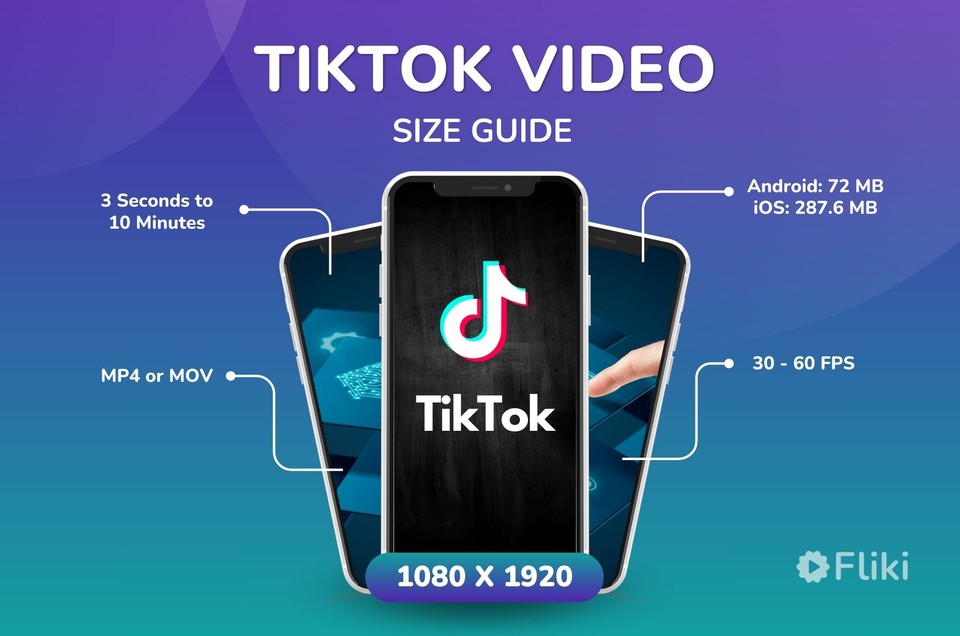
A few file boundaries shape what you can upload. The ceiling is 287.6 MB on iOS and 72 MB on Android, in MP4 or MOV, using the H.264 codec, at a frame rate between 23 and 60 fps (Fliki TikTok specs, 2026). The rest of this article breaks down each ratio in detail, maps the safe zones, and compares TikTok to the other short form surfaces so you know when one file works everywhere and when it does not.
Fliki TikTok VideoFrame Rate
TikTok aspect ratio specifications in detail
What TikTok does with each orientation once you hit upload is where the differences show up.
Vertical (9:16) specifications
- Recommended resolution: 1080x1920 pixels.
- Minimum resolution accepted without obvious quality loss: 720x1280.
- Frame rate range: 23 to 60 fps, with 30 fps as the safest default for fast upload and the fewest re encode artefacts.
- Bitrate guidance: 8 to 10 Mbps for 1080p and 4 to 6 Mbps for 720p.
- Why it is native: the For You feed is full screen vertical, so 9:16 is the only ratio that fills the entire viewport with zero cropping.
Square (1:1) specifications
- Resolution: 1080x1080 pixels.
- Display behavior: TikTok pads the top and bottom with black bars so the square sits centered in the vertical viewport.
- What it costs you: roughly 35 percent of the screen ends up as unused black space, which drags on retention.
- Where it still makes sense: cross posting the same asset to an Instagram feed where one master file covers both placements.
- The call: avoid 1:1 unless cross posting is the only goal, and re export to 9:16 for native TikTok.
Horizontal (16:9) specifications
- Resolution: 1920x1080 pixels.
- Display behavior: TikTok shrinks the video to screen width, leaving large bars above and below.
- Reach impact: horizontal consistently underperforms vertical on the algorithm, in part because completion rate falls when the subject is hard to read on a phone.
- The edge case to watch: TikTok now auto crops some 16:9 uploads to 9:16, so framing you did not plan for can get destroyed.
- Practical rule: only upload 16:9 when the content is repurposed from YouTube and no other version exists.
Safe zones and what TikTok crops automatically
Uploading at exactly 1080x1920 does not protect your whole frame. TikTok layers interface elements over the video, and anything you place under those buttons gets hidden, whether that is a caption, a face, or a CTA.
The top 150 pixels carry the username and the music label, so keep important visuals out of that band. The bottom 350 pixels hold the caption text and hashtags plus the For You Page label, which means no logos or CTAs down there. The right 100 pixels belong to the action sidebar where the like and share buttons sit, so keep subjects and text clear of that column. What is left is a safe content area of roughly 880x1420 pixels centered in the frame, which lines up with the text safe area that independent guides recommend (Kreatli TikTok safe zone guide, 2026). If you only remember one number, keep your subject and any burned in text inside that center box.
How TikTok compares to Reels, Shorts, and LinkedIn vertical
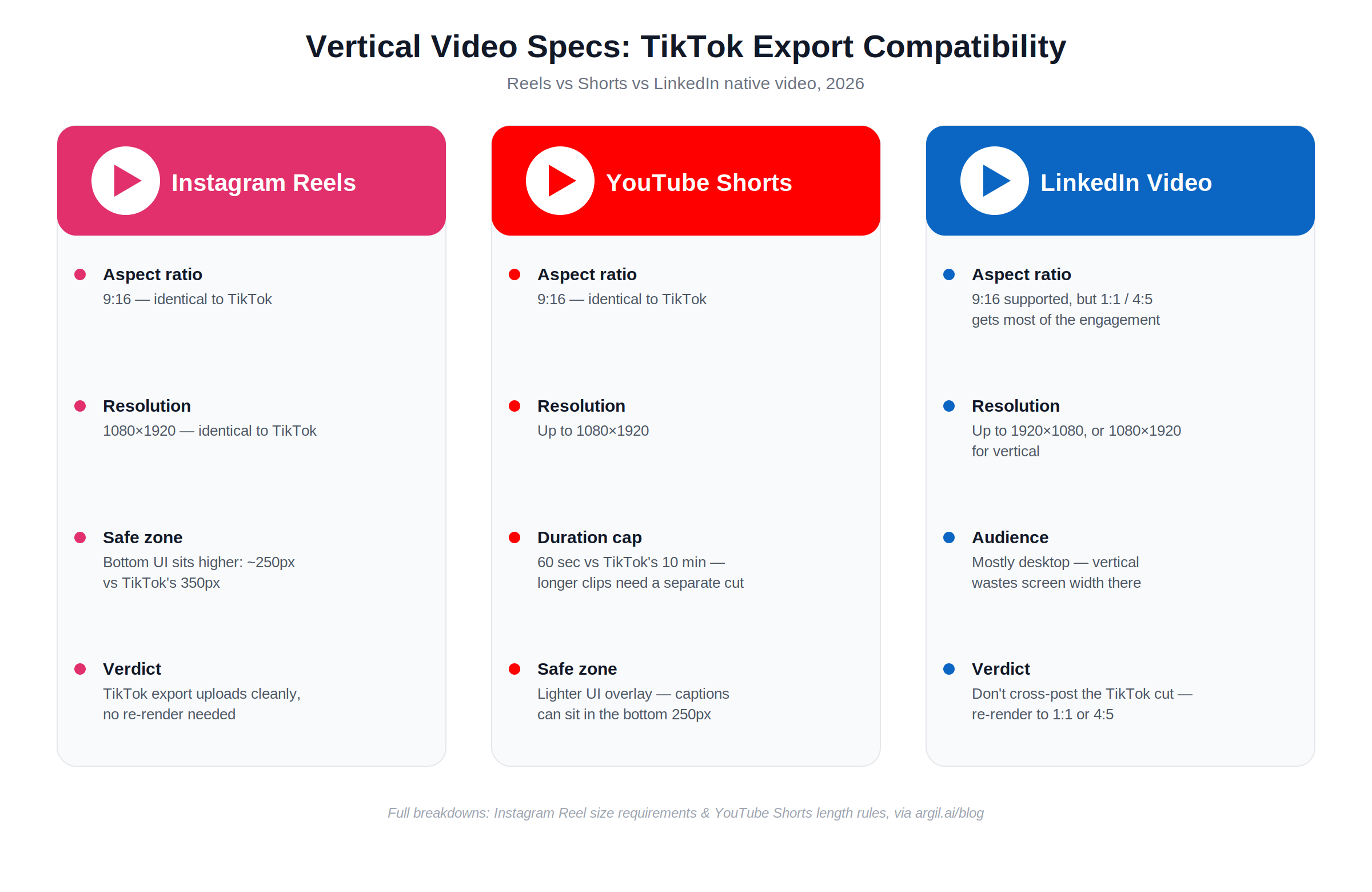
Cross platform creators want to know whether a single 9:16 file works everywhere. For the most part it does, with a few differences worth planning around.
Instagram Reels
- Aspect ratio: 9:16, identical to TikTok.
- Resolution: 1080x1920, identical to TikTok.
- Safe zone difference: Instagram's bottom UI sits a little higher, so its bottom safe zone is around 250 pixels rather than 350.
- Verdict: a TikTok export uploads to Reels cleanly with no re render. If you want to dig into the exact dimensions, there is a full breakdown of Instagram Reel size requirements.
YouTube Shorts
- Aspect ratio: 9:16, identical to TikTok.
- Resolution: up to 1080x1920.
- Duration ceiling: 60 seconds, against TikTok's 10 minutes, so a longer TikTok needs a separate Shorts cut. The platform's Shorts length rules are worth checking before you trim.
- Safe zone difference: Shorts has a lighter UI overlay, so you can push captions into the bottom 250 pixels.
LinkedIn vertical video
- Aspect ratio: 9:16 is supported, but most engagement still happens on 1:1 or 4:5 native feed video.
- Resolution: up to 1920x1080, or 1080x1920 for vertical.
- Audience behavior: LinkedIn viewers are on desktop a majority of the time, where vertical wastes screen width.
- Verdict: do not cross post the TikTok export to LinkedIn directly. Re render to 1:1 or 4:5 for that feed.
This image was generated using AI.
Why 9:16 wins on every short form surface
Step back from the spec sheet and the reason vertical dominates comes down to how people hold their phones. Short form lives on a screen held upright. Vertical video takes up 78 percent more screen space on mobile than horizontal (Embryo, 2026), and 9:16 is the only ratio that claims 100 percent of that viewport.
That geometry is also what the algorithms reward. TikTok, Reels, and Shorts all weight completion rate, and a full screen vertical frame holds attention longer than a boxed in horizontal one. Subject scale feeds into it as well, since vertical lets a face fill most of the frame and that drives the parasocial pull short form runs on. It also leaves room for large burned in captions that read on a phone without zooming, where horizontal squeezes them into a thinner band.
Cross posting is the part that settles the argument. Shoot once in 9:16 and you hold a master file for TikTok, Reels, and Shorts. Shoot in 16:9 and you are cropping or re rendering for every short form destination. That single decision ripples through your whole production schedule, which is why planning aspect ratio up front saves hours later.
How AI video tools handle aspect ratio automatically
The last practical question is whether you really have to re export the same video for every platform. With AI video tools like Argil, you do not.
The traditional path looks like this: shoot in 9:16, edit in 9:16, manually re crop to 1:1 or 4:5 for LinkedIn, then manually re crop to 16:9 for YouTube long form. That is 4 exports per video. The AI path turns that into one job. You write one script, the tool generates your AI clone speaking it, and it renders the 9:16, 1:1, 4:5, and 16:9 versions for you from that single input.
Here is how Argil does it specifically. You upload a 2 minute video once to create your AI clone, then generate fully edited short form videos from text prompts. The same script yields a TikTok cut, a Reels cut, a Shorts cut, and a LinkedIn 1:1 cut without opening a video editor. Captions, b roll, and transitions are baked into the export, so there is no second pass to reposition captions when the aspect ratio changes. The audience this matters most for is people publishing every day: creators, real estate agents, lawyers, and SMBs running an authority play across several platforms at once. For a sense of the workflow in practice, Argil's guide to building an automated TikTok channel shows the script to render loop end to end. Pricing starts at $39 a month on the Classic plan, which lands below the cost of a single manual re render cycle once you count the time.
Frequently asked questions
What is the best aspect ratio for TikTok in 2026?
9:16 at 1080x1920 pixels. It is TikTok's native ratio, the only one that fills the entire screen with no black bars, and the ratio the algorithm rewards with higher completion rates.
Does TikTok still accept 1:1 square videos?
Yes, TikTok accepts 1:1 uploads, but it letterboxes them with black bars on top and bottom. Roughly 35 percent of the viewport ends up unused, which hurts retention and reach. Re export to 9:16 for native performance.
What happens if I upload a horizontal 16:9 video to TikTok?
TikTok displays it with black bars above and below, or auto crops it to 9:16 in some cases. Either way, completion rate drops sharply against native vertical. Horizontal is the worst performing aspect ratio on TikTok by every public metric.
Can I use one 9:16 export for TikTok, Reels, and YouTube Shorts?
Yes. The aspect ratio and resolution requirements are identical across all 3. Safe zones differ slightly, since Reels has a smaller bottom UI than TikTok, but a single 9:16 export uploads cleanly to all 3 without re rendering.
What aspect ratio does LinkedIn prefer for video?
LinkedIn's feed favors 1:1 or 4:5 because most LinkedIn viewing happens on desktop. 9:16 works there but leaves screen space unused on desktop, which suppresses engagement. For LinkedIn specifically, render a separate 1:1 cut.
How do I avoid important content getting cut off by TikTok's UI?
Keep captions, faces, and CTAs inside the safe content area of roughly 880x1420 pixels in the center of the frame. Avoid the top 150 pixels for the username and caption, the bottom 350 pixels for caption text and hashtags, and the right 100 pixels for the action sidebar.
What is the easiest way to make videos in the right TikTok aspect ratio without an editor?
AI video tools like Argil generate fully edited vertical videos from a written script. You upload a 2 minute video once to create an AI clone of yourself, then generate as many TikTok ready 9:16 videos as you need without ever opening a video editor.
Related Articles
- How to create video content without being on camera
- How to go viral on TikTok: the 2026 guide
- 7 best AI video generators for content creators
The definitive 2026 TikTok aspect ratio spec sheet at 9:16 and 1080x1920