YouTube Thumbnail Size: Correct Dimensions and Common Mistakes
YouTube thumbnail size is 3840 x 2160 pixels at 16:9, with a 640 pixel minimum width. Current specs, file size limits, and the mistakes that crop thumbnails.
(Feature Image)
Article Highlights
- YouTube thumbnail size: 3840 x 2160 pixels, 16:9 ratio
- Minimum width is 640 pixels, JPG, GIF or PNG only
- File caps: 2 MB from mobile, 50 MB from desktop
- YouTube thumbnail size for Shorts: 9:16 at 2160 x 3840
- Vertical uploads get an auto generated 4:5 crop
- Argil turns one 2 minute clip into short form videos
The recommended YouTube thumbnail size is 3840 x 2160 pixels at a 16:9 aspect ratio, with a minimum width of 640 pixels. Accepted formats are JPG, GIF, and PNG. File size caps depend on your upload device, at 2 MB on mobile and 50 MB on desktop.
What is the correct YouTube thumbnail size?
YouTube publishes one recommendation for custom thumbnails, and it asks for more resolution than the figure most guides still quote. The full spec, published in YouTube's own help documentation, is short:
- Recommended resolution: 3840 x 2160 pixels
- Minimum width: 640 pixels
- Aspect ratio: 16:9, which YouTube calls the most used ratio in its players and previews
- File formats: JPG, GIF, or PNG
- File size from mobile: 2 MB for video thumbnails, 10 MB for podcast thumbnails
- File size from desktop: 50 MB for video and podcast thumbnails alike
- Account requirement: custom thumbnails need a verified account
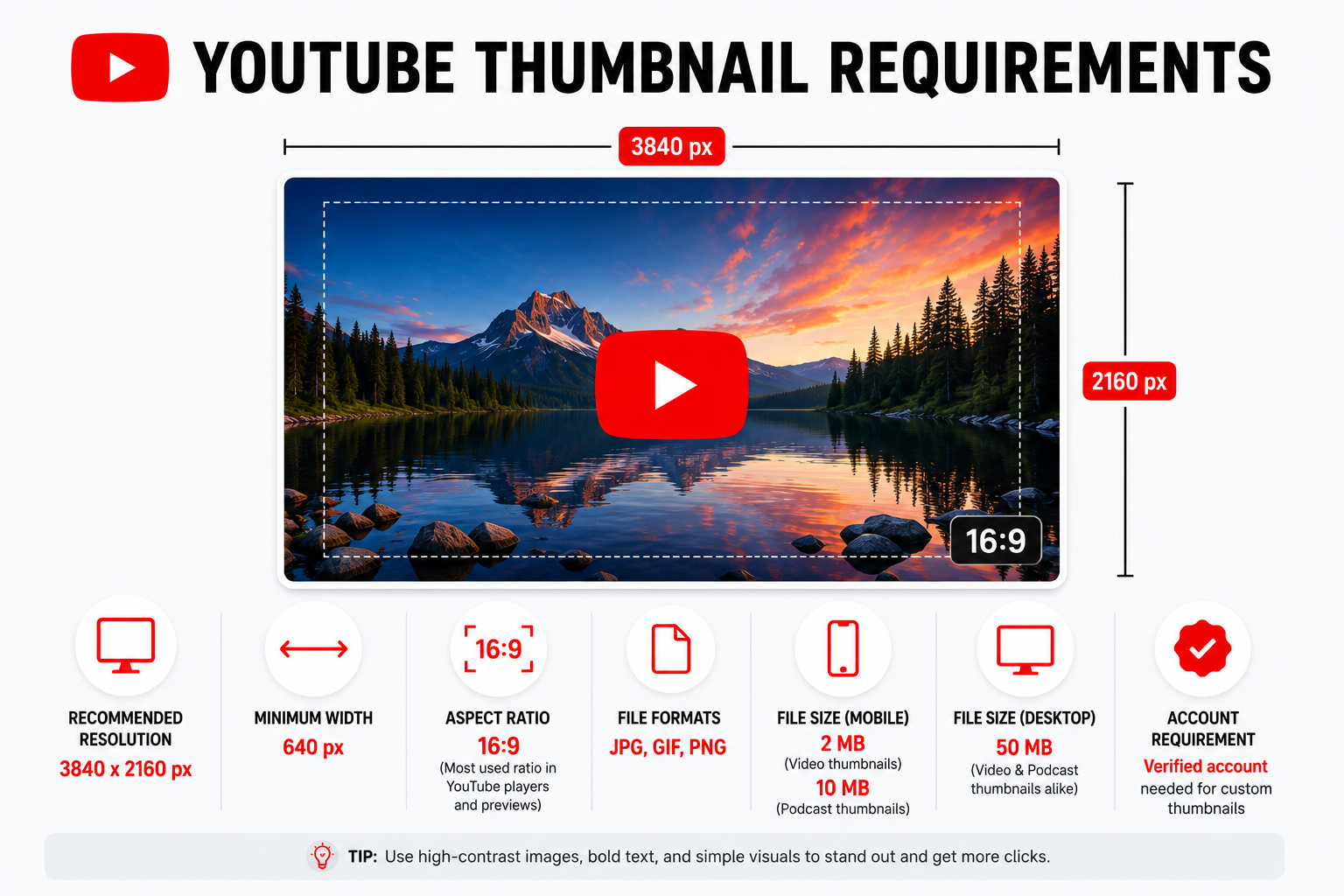
The reasoning YouTube gives is that your thumbnail should be as large as possible, because the same file becomes the preview image in the embedded player. One file ends up carrying every render:
- The small tile in a phone search result
- The still frame on a living room television before anyone presses play
- The image loading inside an article that embedded your video
Treat the 640 pixel minimum width as a floor rather than a target. A file that lands near it has almost no detail to give the larger renders above, and that shortfall is where soft, mushy text comes from.
Why you keep seeing 1280 x 720 for YouTube thumbnail size
Search this term and the answers disagree. Several of the guides you will land on still list 1280 x 720 pixels and a flat 2 MB limit, because that was the settled community answer for years. YouTube's live documentation now recommends 3840 x 2160.
Both numbers describe a working file. A 1280 x 720 export clears the 640 pixel minimum width and sits at exactly 16:9, so it uploads without complaint. It has simply stopped being what YouTube asks for, and it has nothing spare when the platform renders it large.
So build the artwork at 3840 x 2160 and judge it at thumbnail size.
Building small and exporting large is upscaling, which hands YouTube exactly the soft file the resolution rule exists to prevent. The canvas starts at full size so the detail is genuinely there. Judging is a separate step. Zoom that canvas out until it sits at the size of a phone search result and make your typography calls there, because legibility is decided at the smallest render your viewer will ever see and no amount of resolution rescues a headline set in thin type.
For long form YouTube, 16:9 is the answer and has not moved. Where it does change is everywhere else you publish, which our breakdown of vertical and horizontal aspect ratios walks through.
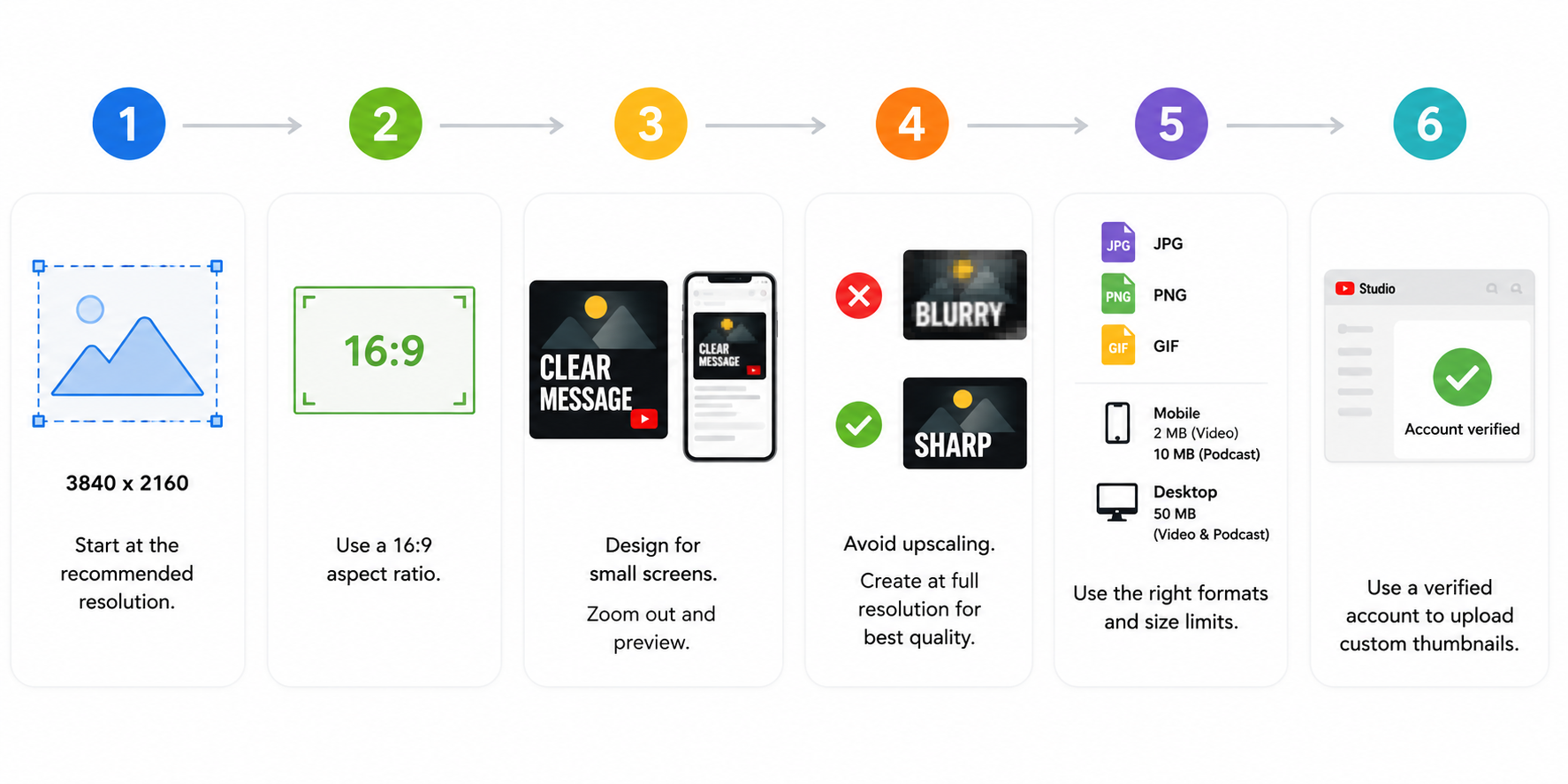
Every YouTube thumbnail size, by video type
The right size stops being a single number the moment you leave standard horizontal video. YouTube specifies a different ratio for each of these:
- Long form video: 16:9, at 3840 x 2160 pixels
- Shorts and Shorts ads: 9:16, at 2160 x 3840 pixels
- Podcast playlists: 1:1, instead of 16:9
The podcast rule is the easiest one to miss, because 1:1 is a square and every other asset in a video workflow is a rectangle. If you run a podcast playlist on YouTube and keep feeding it 16:9 artwork, you are handing YouTube a rectangle to fit into a square slot.
Ratio is only half of what constrains a Short, since how long a YouTube Short can be shapes the frame you end up with just as much. Push the same footage to Instagram and every number moves again, which is why we keep Instagram Reel dimensions on their own page.
What YouTube does to your thumbnail after you upload it
This is the part the size guides skip, and it explains cropping that looks like an export error but is not one. YouTube applies its own rules to your image after you press save.
Vertical videos get their thumbnail replaced
If you upload a vertical video with a 16:9 custom thumbnail, YouTube replaces it with an auto-generated 4:5 thumbnail on the home, explore, and subscription pages. Your custom thumbnail still appears on the watch feed, in watch history, and on non-mobile platforms.
Publish vertical long form with one carefully built 16:9 image and it survives on the watch feed and on desktop, while home, explore and subscriptions show a crop YouTube generated without you. That reverses where your effort should go. Your uploaded thumbnail only governs the surfaces that keep it, and the discovery feeds are served by whatever YouTube derives from the video, so the footage itself has to hold up as a still. Shoot vertical with a center safe frame worth auto-cropping.
Shorts do not accept an uploaded thumbnail at all
You cannot upload a custom image file for a Short the way you can for long form video. You select a frame from the Short itself, and that frame becomes the thumbnail shown in search results, on hashtag and audio pivot pages, and on your channel page. YouTube's thumbnail documentation says the selection cannot be changed once the video is uploaded, while its Shorts documentation describes choosing the frame both before and after upload, from the YouTube app only. Treat the frame you pick as final and you will never be caught out by which of those applies to your account.
That moves the whole design decision upstream. Your only candidates are moments that already exist in the footage, so the thumbnail for a Short gets decided while you are still filming. Shoot a deliberate frame for it. The mechanics are in our walkthrough on uploading a YouTube Short.
Thumbnails can be rejected, and can carry a strike
Every custom thumbnail has to clear the YouTube Community Guidelines. Nudity or sexually provocative content, hate speech, violence, and harmful or dangerous content can all get a thumbnail rejected and a strike issued against the account. Repeat offenses can cost custom thumbnail privileges for 30 days, or lead to termination.
There is also a daily cap on how many custom thumbnails a channel can upload, and it varies by country or region and by channel history. The error telling you the daily custom thumbnail limit has been reached is that cap firing. Waiting 24 hours clears it.
Common YouTube thumbnail size mistakes
Four failures are worth fixing before anything else. Only the first is really about the image file at all.
- Uploading a heavy file from your phone. The cap is 2 MB from mobile and 50 MB from desktop for the identical video thumbnail, a 25 times difference decided purely by which device you happen to be standing at. If your artwork keeps getting crushed on upload, stop lowering the export quality and open your laptop.
- The bottom right corner is not yours. YouTube's duration badge occupies it in the player and across every feed, so a face or a headline word placed there is competing with a black pill it will always lose to.
- Hunting for a Short's thumbnail control in Studio. It is not there. Shorts thumbnails are handled in the YouTube app, so searching the desktop interface for the option will not turn one up.
- Skipping account verification. Custom thumbnails require a verified account. Until you verify, the upload option is absent from Studio entirely, so verify before you conclude anything is broken.
Getting the size right is the smallest part of the job
Thumbnail dimensions are a one time fix. You set an export preset once and the problem is solved for every upload after it.
Volume is the problem that does not solve itself, and YouTube's own tooling shows why it matters. Its Test and compare feature lets you run up to 3 titles and thumbnails against each other, gives the win to whichever combination earns the highest watch time, and expects the test to resolve inside 2 weeks. It also does not run on Shorts. Learning what your audience clicks means running that test repeatedly, on video after video, which is a function of how much you publish.
A channel with nothing in the pipeline has no thumbnail problem worth solving. Argil exists for that side of it. You upload a 2 minute video of yourself once and get an AI clone that generates short form videos from your scripts, with captions, b-rolls and the editing handled inside the pipeline. Thumbnails stay your job. The publishing rhythm is what makes getting them right worth the effort.
FAQ
What is the best size for a YouTube thumbnail?
Build at 3840 x 2160 pixels in 16:9. That is what YouTube recommends, and it leaves enough detail for the embedded player and for television screens. Anything from 640 pixels wide upward is accepted, though the smaller the file, the more the platform has to stretch it.
Why is my YouTube thumbnail blurry?
Usually resolution or compression. A file close to YouTube's 640 pixel minimum has little detail to survive the bigger renders, and the fix there is to rebuild at 3840 x 2160. If the source artwork is already large, the culprit is compression, and uploading from a desktop instead of a phone raises your allowance from 2 MB to 50 MB.
Why can't I upload a custom thumbnail on YouTube?
Custom thumbnails are only available on a verified account. If the upload control is missing from Studio, verification is the usual reason. Channels that have hit the daily custom thumbnail limit, or that have Community Guidelines strikes affecting their history, can also lose access.
Can you upload a custom thumbnail for YouTube Shorts?
No. Shorts take a frame from the video itself instead of an uploaded image file, and the choice locks once the Short is published. Plan that frame while you are shooting.
Closing
Get the YouTube thumbnail size right once and save it as an export preset. The preset worth keeping is 3840 x 2160 at 16:9, uploaded from a desktop, with the bottom right corner left clear. Then spend the time you saved on publishing often enough for any of it to matter.
Related Articles
YouTube thumbnail size specs, aspect ratios, file limits, and crop rules for creators publishing video in 2026