Instagram Story Dimensions: Exact Sizes and the Real Safe Zone
Instagram Story dimensions are 1080x1920 at 9:16. Get the exact safe zone per format, why the 250px rule understates the bottom, and a pre-publish checklist.
Article Highlights
- Instagram Story dimensions: 1080x1920 pixels at 9:16
- Safe zone: 250px top, 340px bottom clear of text and logos
- Design to a center 1080x1330 block for every surface
- Wrong Instagram Story dimensions mean crops and blur
- Photo, video, ad and Highlight cover each differ
- Argil builds vertical Stories from a script, no reframing
Instagram Story Dimensions: Exact Sizes and the Real Safe Zone
(Feature image)
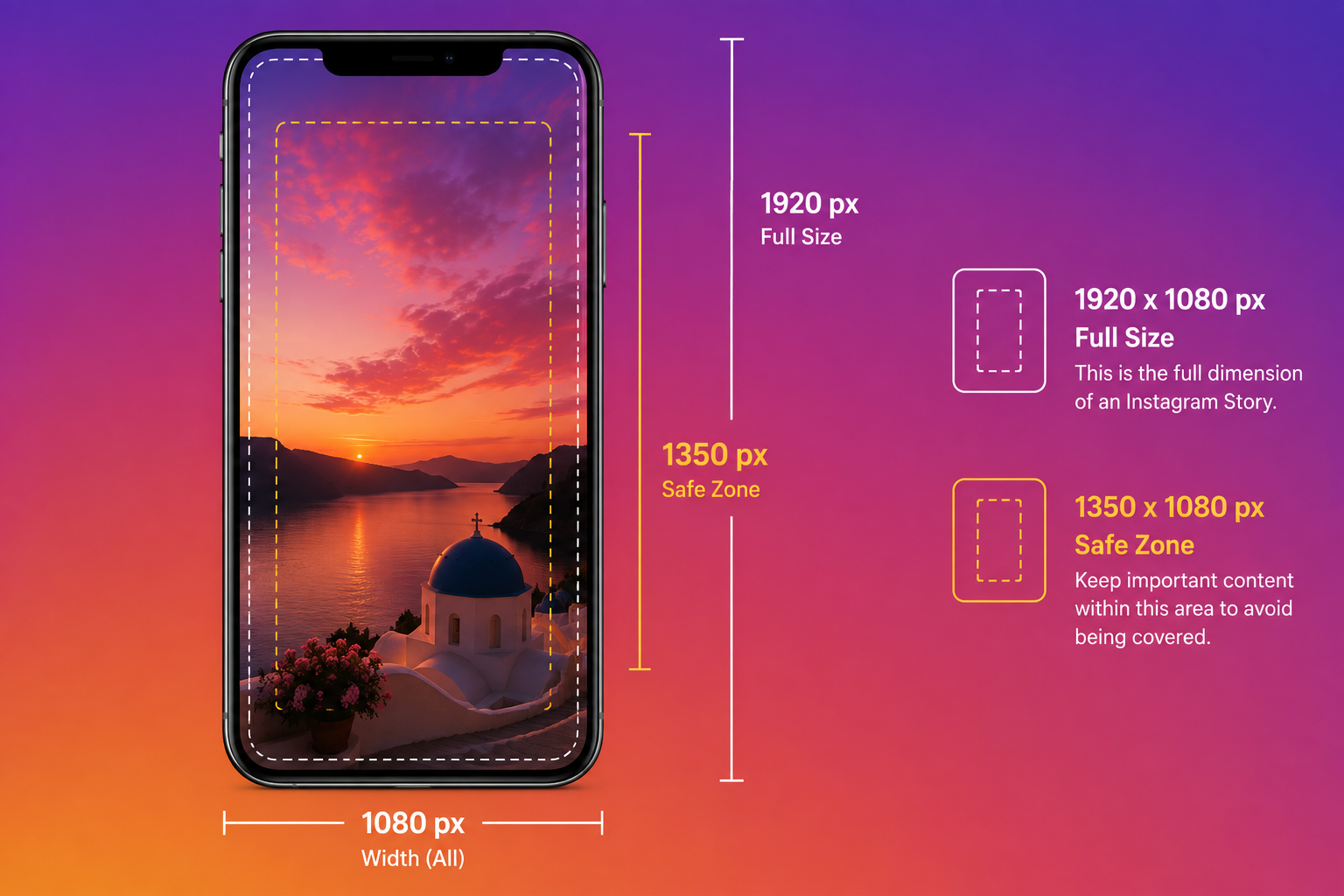
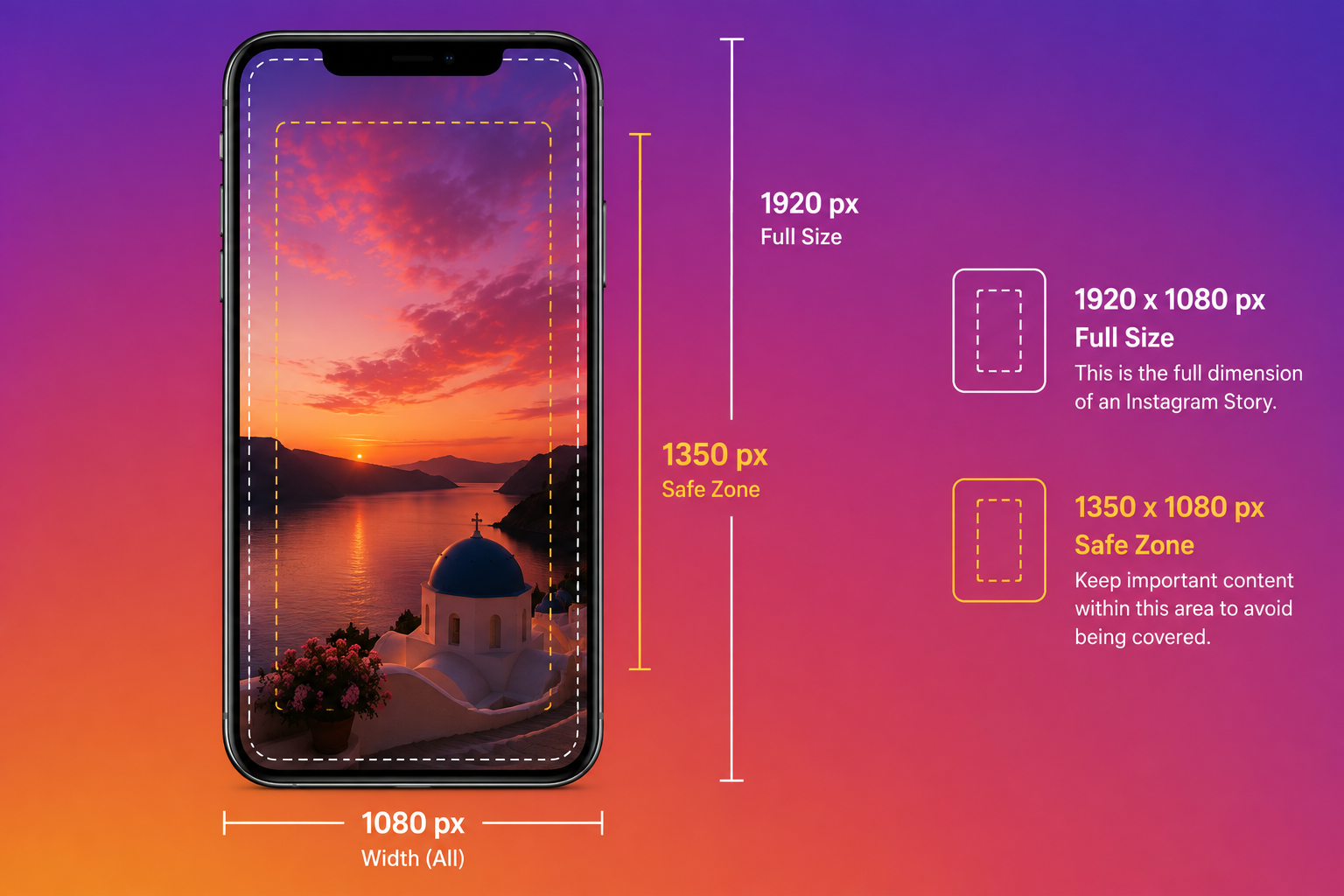
Instagram Story dimensions are 1080 x 1920 pixels at a 9:16 aspect ratio. Instagram's interface sits on top of that canvas, so keep text, faces and calls to action inside a centered 1080 x 1330 block. Build to that and the same file works as an organic Story and as a Story ad.
What are the correct Instagram Story dimensions?
1080 pixels wide by 1920 pixels tall is the full screen vertical canvas Instagram renders on a phone, and every organic Story surface uses those Instagram Story dimensions, Highlights included.
Here is the working spec. Sprout Social's social media image sizes guide and Hootsuite's image sizes guide are the source for the canvas, the ratio and the safe area. The file and duration ceilings below are the limits social media spec guides consistently publish.
- Resolution: 1080 x 1920 pixels
- Aspect ratio: 9:16
- Image file types: JPG and PNG
- Video file types: MP4 and MOV
- Image file size: under 30 MB
- Video file size: under 4 GB
- Duration: up to 60 seconds per Story card
The first 2 entries on that list carry the most weight. The 1080 x 1920 canvas is what stops Instagram scaling your file, and the 9:16 ratio keeps it from cropping. Miss either and the platform makes the call for you, which is the usual cause behind a Story that came out looking wrong.
If the ratio itself is new to you, we wrote a longer piece on what aspect ratio means and which ones suit vertical and horizontal video.
The Instagram Story safe zone, and why the 250px rule gets the bottom wrong
Search this topic and almost every result gives you the same number. Leave roughly 250 pixels clear at the top and 250 at the bottom. That figure gets repeated so often it reads like a published spec, and it is only right about the top. The published bottom reserve is 340 pixels, around 90 more than the number everyone quotes.
3 different figures circulate, and each one answers a different question.
- The measured UI chrome: roughly 250 pixels at the top and 250 at the bottom get covered by Instagram's interface, leaving a center area of 1080 x 1420. This is a community measurement of what the app draws on screen, not a figure Meta publishes.
- The stated safe area: Sprout Social and Hootsuite both put the Instagram Stories safe area at 1080 x 1610, which works out to about 155 pixels of reserve at the top and the same at the bottom. This is the loosest of the 3. The same 2 publishers also carry the tighter figure below, because the 2 answer different questions. One describes what the interface physically covers, the other describes where Meta says to keep text and logos.
- The published text and logo guidance: leave 250 pixels at the top and 340 pixels at the bottom free of text and logos. Sprout Social and Hootsuite both report this pairing for Instagram Stories. It is the only asymmetric figure of the 3, and the extra reserve at the bottom lines up with where the reply bar sits.
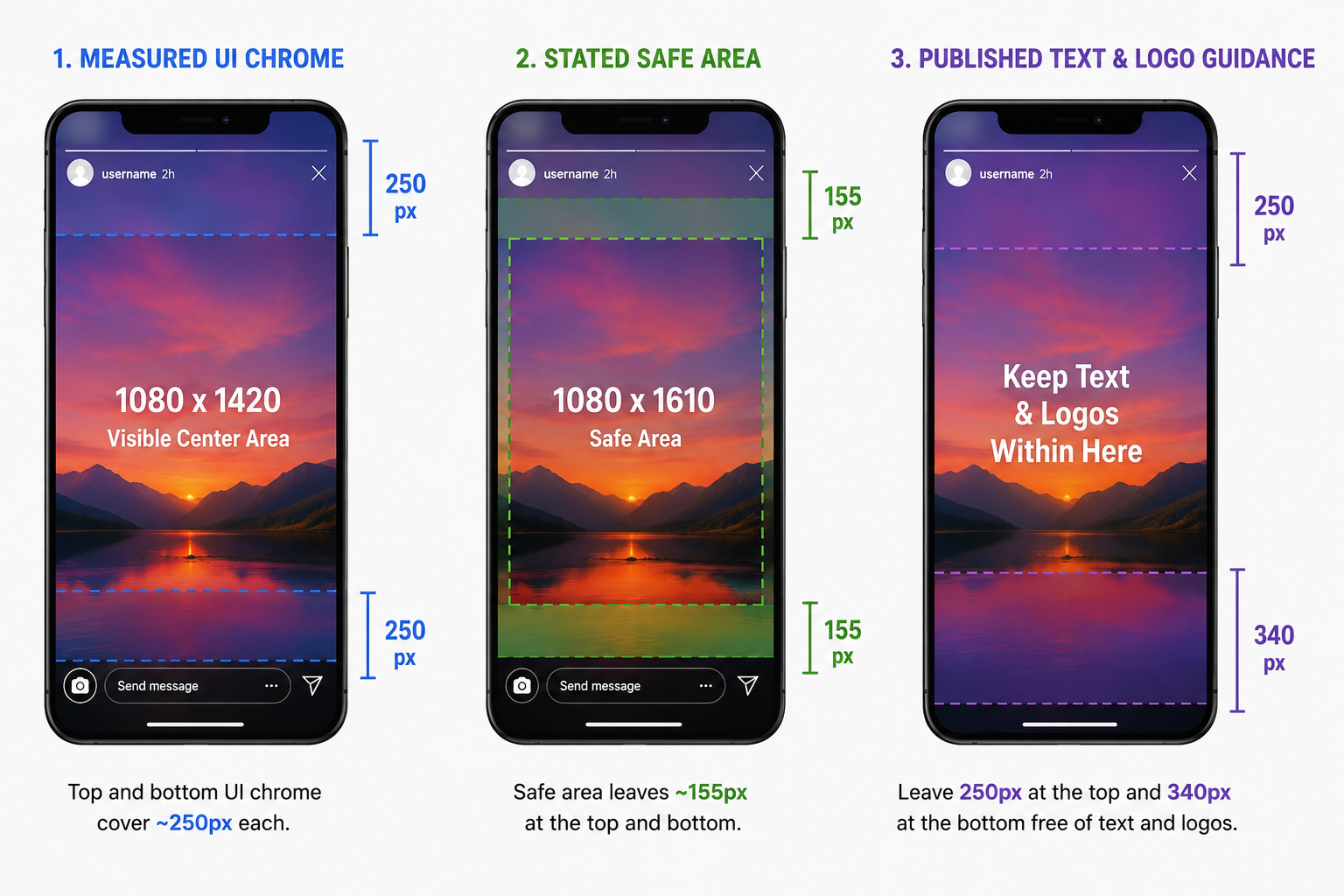
Our rule is to design to the strictest of the 3, every time. Keep text, logos, faces and any call to action inside a centered 1080 x 1330 block, which is what 1920 minus 250 minus 340 leaves you. A creative that reads cleanly inside that block holds up on a small phone with a tall notch, and it survives being promoted into a paid Story placement later without a re-export. Designing to the loosest figure gains you 280 extra pixels of canvas, and you give that back the first time a Story does well enough to put money behind it.
Worth noting if you also make Reels. Both surfaces are 9:16, but the chrome differs, and our guide to Instagram Reel size works to a shallower bottom reserve because Reels load the right edge and the caption bar instead of a reply field. Stories hold back more at the bottom. If you produce for both from one master, cut to the Stories number and you are covered on both.
What sits in the top zone
Your profile bubble, account name and the timestamp run across the upper band, and the segment progress bars sit above them at the very top edge. The practical consequence is that a logo lockup parked in a top corner disappears behind the progress bars on smaller devices, which is where a lot of brand templates put it.
What sits in the bottom zone
The reply field, the send and share controls, and the landing area for link stickers all live in the lower band. That is why the published bottom reserve is larger than the top. A call to action pinned near the bottom edge is the most common Story mistake we see.
The side margins
Keep roughly 65 pixels clear on each side as well. That figure is a design convention rather than a published Meta spec, and it exists because nothing in the interface covers the sides on most devices, but text running to the edge reads cramped and clips on rounded display corners.
Instagram Story dimensions by format
The 9:16 shape holds across every Story format. Each format then adds its own constraint on top of it.
Photo Stories
1080 x 1920, JPG or PNG, under 30 MB. A photo Story plays for about 5 seconds, and Instagram gives you no control to change that, so the way to hold a still frame longer is to upload it as a short video instead. Because there is no motion holding attention, photo Stories are where safe zone discipline matters most.
Video Stories
1080 x 1920, MP4 or MOV, under 4 GB, up to 60 seconds per card. Upload something longer and Instagram splits it into back to back 60 second segments, cutting on the clock with no regard for where a sentence ends. We covered what that does to pacing and completion rate in our piece on how long an Instagram Story can be.
Story ads
Same 9:16 shape, higher resolution master. This is the one place the pixel dimensions change. Sprout Social lists 1440 x 2560 for Stories ads, with a minimum width of 500 pixels and a 30 MB cap on the image version. The same proportional text and logo reserve applies at the top and bottom, and Ads Manager has a safe zone guardrail you can toggle on in the placement preview, which shades the covered regions so you can check the creative before the ad runs.
Highlight covers
A Highlight cover is a circular crop pulled from a 1080 x 1920 frame. The circle can be no wider than the 1080 pixel width, so a cover designed for the full rectangle loses the top and the bottom of it, roughly 420 pixels at each end. Center the subject or the word you want visible inside the middle 1080 x 1080 square, and check it as a circle before you save it.
Link stickers and interactive stickers
Polls, quizzes, question boxes, countdowns and link stickers all land inside the lower band. Put a headline there as well and the sticker sits on top of it.
What actually happens when you upload the wrong size
Upload a badly sized Story and Instagram accepts it, then fixes it for you. Its fix is a crop or a re-encode you did not choose.
A 16:9 landscape clip gets letterboxed, so it plays as a strip in the middle of the frame with black bars or a blurred fill above and below. A 1:1 square gets padded the same way. Anything meaningfully wider or narrower than 9:16 gets auto cropped, and Instagram centers that crop on the frame, so a caption sitting low or a face sitting high gets cut. Files that are oversized, undersized or in an unexpected codec get re-encoded, and re-encoding is what produces the muddy, blocky look people describe as a blurry Story.
There is a cost beyond the pixels. A letterboxed Story announces in its opening frame that it was made for somewhere else, which is a hard thing to recover from on a surface people tap through in seconds.
Repurposing is where we see this most. Somebody takes a webinar recording or a YouTube upload, drops the 16:9 file straight into a Story, and ships something with roughly half its canvas empty on the surface where attention costs the most. The same trap exists across platforms, which is why we keep a separate reference on TikTok aspect ratio.
How to get correctly sized Stories out of long video
Reframing a 16:9 source means deciding, cut by cut, what stays in a frame that is now less than a third as wide. Resizing alone will not do it. Doing the job by hand means repositioning the subject on every shot, setting guides at 250 pixels from the top and 340 from the bottom so captions and lower thirds stay clear, re-exporting, then checking the result on a phone screen. It is slow, and it has to be redone for every asset you own.
Argil takes the other route. It generates short form video from a script, using an AI clone built from a 2 minute recording of you, and the editing pipeline of captions, b-roll and transitions runs on top of that. Because the output is composed vertically at generation time, nothing needs reframing afterwards. That matters most if you publish Stories daily and the reframing queue is what caps your output.
Volume is what makes that case. If you produce 2 Stories a month from footage you already love, reframe it by hand and keep the original performance. The argument for generating vertical natively gets stronger the more surfaces you publish to. Our walkthrough on posting videos from YouTube to Instagram covers the manual route in full if that is where you are.
Instagram Story dimensions checklist before you publish
- Export at exactly 1080 x 1920 pixels.
- Confirm the ratio reads 9:16, not 16:9 with padding baked in.
- Keep text, logos, faces and calls to action inside a centered 1080 x 1330 block.
- Place any link sticker or poll deliberately in the lower band, so it does not cover your headline.
- Check file type and size. JPG or PNG under 30 MB, MP4 or MOV under 4 GB.
- Keep each card under 60 seconds, or split it yourself on a natural beat.
- Preview on the smallest phone you own before posting.
FAQ
Why do my Instagram Stories get cropped?
Because the file is not 9:16. Instagram auto crops anything outside that ratio to fill the 1080 x 1920 canvas, and it centers that crop on the frame, so your subject can drift out of it. Export at 1080 x 1920 and the crop never happens.
Why do my Instagram Stories look blurry?
Blur almost always comes from re-encoding. If your file sits below 1080 x 1920, or arrives in a codec Instagram has to convert, the platform compresses it on upload. Export at exactly 1080 x 1920 in MP4 or MOV and the re-encode stays minimal.
Can I use a horizontal photo or video for an Instagram Story?
You can, but Instagram letterboxes it with black bars or a blurred fill above and below. Reframing the horizontal source to 9:16 yourself, keeping the subject inside the safe zone, gives a better result than letting the platform pad it.
What is the Instagram Story safe zone in pixels?
Sprout Social and Hootsuite both report the guidance as 250 pixels at the top and 340 pixels at the bottom left free of text and logos, on a 1080 x 1920 canvas. That leaves a working area of 1080 x 1330. Keep roughly 65 pixels clear on each side as well.
Can I post a video longer than 60 seconds to an Instagram Story?
Yes. Instagram splits anything longer into back to back 60 second segments automatically, and each segment earns its own metrics in Insights. Cutting the source into 60 second pieces yourself gives you cleaner breaks.
Stop reframing every asset by hand
Instagram Story dimensions are 1080 x 1920 at 9:16, with text and logos kept inside a centered 1080 x 1330 block. Run the checklist above on your next Story. If the slow part is reframing a whole library of horizontal footage, Argil builds them vertical from a script instead.
Related Articles
- Instagram Reel Size: How to Make Reels That Actually Perform in 2026
- How to Repurpose Blog Content into Short Form Videos with AI
- Ideas to Hold Attention on Instagram
Instagram Story dimensions, safe zones and format specs for creators publishing vertical video